How download managers work comes down to one HTTP feature. The program asks the server for the file's size and whether it accepts HTTP range requests. If it does, the manager splits the file into byte ranges, opens several connections, and asks each one for its own slice with a Range: bytes=start-end header. Every slice is written to the right offset on disk. Because each slice is a separate request, the manager can stop at any byte and later ask for the rest, which is what makes a resume download possible. When all slices arrive, a good manager checks the size and, ideally, a SHA-256 hash.
Download managers differ in how carefully they handle each of those steps, and I pay attention to that because I build one. Gale is my own free, MIT-licensed download manager for Windows, and I'll use it as the worked example near the end. Everything before that applies to any download accelerator, and you can check it yourself with curl.
The one header everything depends on: Range
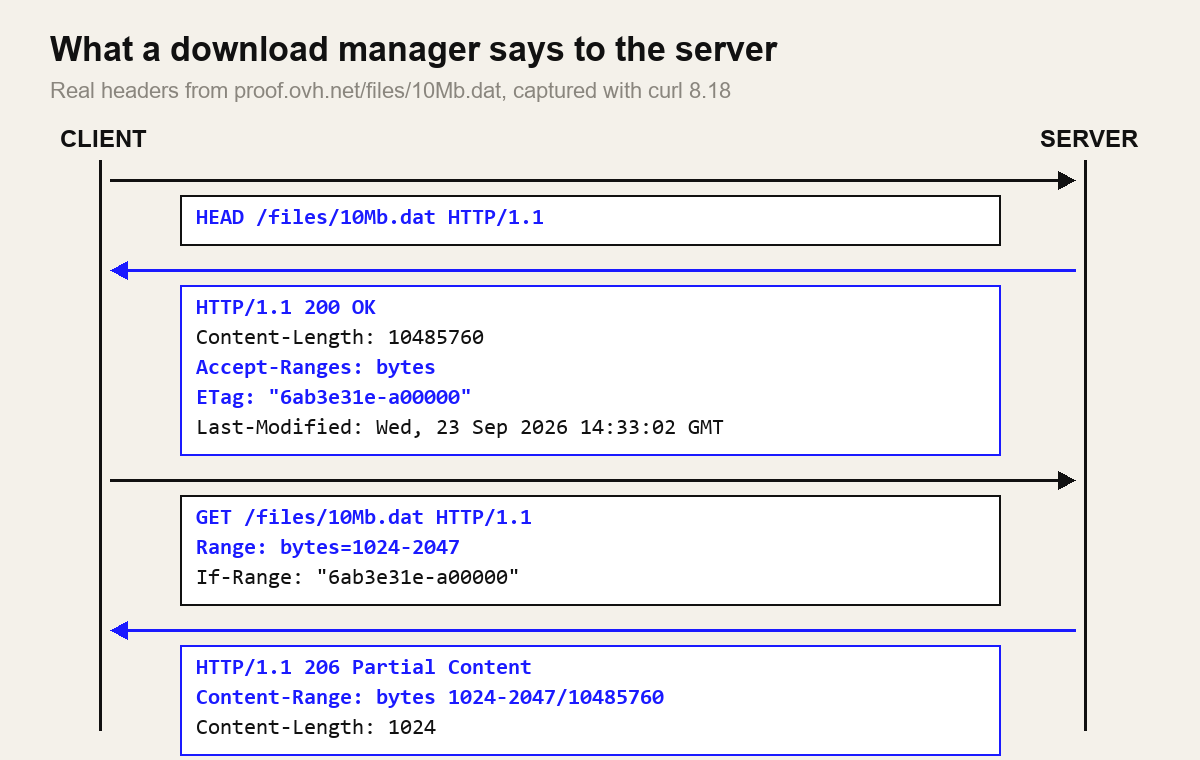
HTTP has supported partial downloads for a long time. The current rules are in RFC 9110, section 14 (Range Requests). Five pieces matter:
- Accept-Ranges (section 14.3). A server sends
Accept-Ranges: bytesto say it can serve byte ranges.Accept-Ranges: nonemeans don't bother. - Range (section 14.2). The client asks for
bytes=0-1023(the first 1,024 bytes),bytes=5000-(byte 5,000 to the end), orbytes=-500(the last 500 bytes). Offsets start at zero and the end is inclusive. - 206 Partial Content (section 15.3.7). The success code for a range response. A plain
200 OKmeans you got the whole file instead. - Content-Range (section 14.4). The server's receipt:
bytes 1024-2047/10485760means "these bytes, out of a file this long." - 416 Range Not Satisfiable (section 15.5.17). You asked for bytes past the end. The server should reply with
Content-Range: bytes */lengthso you learn the real size.
One sentence in section 14.2 explains most download manager bugs: "A server MAY ignore the Range header field." The server decides. A client that assumes it got a slice, without checking for 206 and a matching Content-Range, will eventually write a full file, or an error page, into the middle of another file.
Try it yourself: real headers with curl
You don't need a download manager to see any of this. curl ships with Windows 10 and 11, macOS and most Linux systems. I ran the commands below on 8 November 2026 with curl 8.18 against OVH's public test file proof.ovh.net/files/10Mb.dat, a 10 MiB file meant for speed tests. I've trimmed the output to the headers that matter.
1. Ask what the server supports
curl -I https://proof.ovh.net/files/10Mb.dat

HTTP/1.1 200 OK
Server: nginx
Content-Length: 10485760
Last-Modified: Wed, 23 Sep 2026 14:33:02 GMT
ETag: "6ab3e31e-a00000"
Accept-Ranges: bytes
This is the response a download manager hopes for. It has a length (so the file can be split), Accept-Ranges: bytes, and a strong ETag, meaning no W/ prefix. The ETag will matter when we get to resuming.
2. Fetch one slice
curl -r 0-1023 -o part0 -D - https://proof.ovh.net/files/10Mb.dat

HTTP/1.1 206 Partial Content
Content-Length: 1024
Content-Range: bytes 0-1023/10485760
-r is curl's short form of --range. Notice the three things to check: the status is 206, the length is what you asked for, and Content-Range names the same bytes. A suffix range works too. curl -r -500 came back as bytes 10485260-10485759/10485760.
3. Ask for something impossible
curl -r 20000000- -D - -o /dev/null https://proof.ovh.net/files/10Mb.dat

HTTP/1.1 416 Requested Range Not Satisfiable
Content-Range: bytes */10485760
That is exactly the 416 behaviour the RFC describes. A resume routine can use it: if your partial file is already as long as the real file, the server tells you so.
4. A server that says no
Not every server cooperates. The same curl -r 0-1023 against the plain-text copy of RFC 9110 on rfc-editor.org (behind Cloudflare) returned 200 OK and the whole document, with no Accept-Ranges header and a weak ETag (W/"7c9f..."). Range was simply ignored, which the spec allows. A download manager facing this has one honest option: use a single connection and accept that a pause means starting over.
Multi-connection download: why splitting a file can be faster
A multi-connection download is just step 2 run several times in parallel with different offsets. Splitting a 10 MiB file four ways gives ranges like 0-2621439, 2621440-5242879 and so on. The question is why four connections would ever beat one, since they share the same cable. There are three real reasons.
Per-connection speed limits
Some servers and hosting setups cap the speed of each connection rather than each user. If a mirror allows 500 KB/s per connection, four connections get you around 2 MB/s, provided your line can carry it. This is the plainest case and the one most download managers were originally built for.
TCP slow start and the congestion window
TCP doesn't send at full speed from the first packet. Under RFC 5681, a sender keeps a congestion window that limits how much unacknowledged data can be in flight. It starts small and roughly doubles every round trip during slow start. RFC 6928 (an Experimental RFC, now widely deployed) raised the starting point to about 10 segments, roughly 14.6 KB. On a 130 ms path, which is the average ping I measured to OVH's test server, that first round trip moves very little data. Four connections ramp up four windows at once, so the transfer reaches full speed sooner. On short files that early ramp is a large share of the total time.
Long, lossy paths
Once a connection is past slow start, packet loss sets its ceiling. Mathis, Semke, Mahdavi and Ott's 1997 paper, The Macroscopic Behavior of the TCP Congestion Avoidance Algorithm, gives the well-known approximation: throughput is about MSS / (RTT × √p), times a constant near 1.2, where p is the loss rate. Double the round-trip time and a single connection's ceiling halves. Each extra connection carries its own window and its own ceiling, so on a long path with some loss, N connections can approach N times the throughput of one.
Researchers measured this directly. Hacker, Athey and Noble's IPDPS 2002 study of parallel TCP sockets on a lossy wide-area network found that parallel streams raise aggregate throughput up to the point where they start causing congestion themselves. Scientific data transfer adopted the idea at scale. The Globus Striped GridFTP paper (Allcock et al., SC'05) describes moving data over several parallel streams at once, and that design won the SC25 Test of Time award last year.
The same maths also tells you when it won't help. If you're on a short path with no loss and no per-connection cap, one connection already fills your line, and extra ones add overhead and nothing else.
Dynamic segment splitting, or why the last 5% is slow
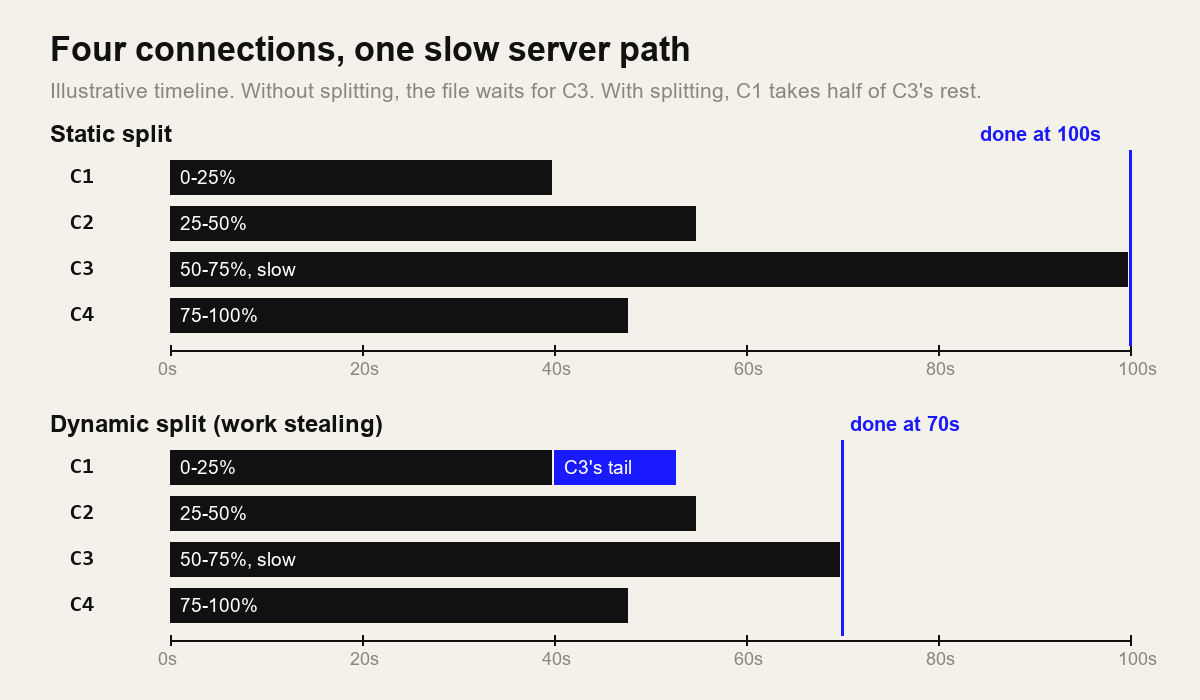
The naive approach divides the file into N equal parts up front. Then one connection lands on a slow route or a busy server node, the others finish and sit idle, and the whole download waits on the straggler. That's the progress bar crawling through its last few percent.
The fix is a form of work stealing. When a connection finishes its range, the manager looks for the segment with the most bytes left, cuts that remaining range in half, and hands the back half to the idle connection with a new Range request. The slow connection keeps its front half, and nothing is downloaded twice because the slow connection's end offset is simply moved earlier. Repeat until every connection is busy or the remaining pieces are too small to be worth a new request. aria2 exposes that floor as --min-split-size, 20 MiB by default per its manual.
When a download accelerator doesn't help, or is rude
I learned this one the direct way while writing this article. I wrote a quick Bash loop that split OVH's 100 MB test file into eight ranges and started eight curl processes at once. One got its 13,107,200 bytes. The other seven got 429 Too Many Requests, an nginx error page saying, in short, that the server rate-limits on purpose and that I should wait about ten seconds. Later attempts timed out completely for a while, so I stopped.
My script also made the classic mistake. It used curl -s without -f, so curl saved the 1,606-byte error page into each part file, and the "assembled" file was 13 MB of data plus seven HTML pages. The SHA-256 didn't match the single-connection copy, which is how I noticed. A real download manager has to check the status code before writing a byte, and back off on 429 and 503 using the Retry-After header.
Here is when extra connections don't help, or actively hurt:
| Situation | What happens | What a good client does |
|---|---|---|
Server ignores Range or sends Accept-Ranges: none | Every request returns the whole file with 200 | One connection, no resume |
| Server or CDN limits connections per IP | 429, 503 or dropped connections | Respect Retry-After, reduce connections |
| Short, clean path with no per-connection cap | One connection already fills the line | Extra connections add nothing |
| Shared or congested network | You take bandwidth from others on the same link | Use fewer connections, or a speed limit |
| HTTP/2 or HTTP/3 server | Ranges share one connection's congestion control | Multiplex on one connection |
The HTTP/1.1 spec has always asked for restraint. RFC 9112, section 9.4 says a client "ought to limit the number of simultaneous open connections" to a server, without setting a number. The fairness problem is the flip side of the Mathis formula: if each TCP connection gets roughly an equal share at a bottleneck, whoever opens eight connections gets eight shares. On an empty link at 3 a.m. nobody minds. On a shared office line, your coworkers do.
HTTP/2 and HTTP/3 change the picture
Over HTTP/1.1, one connection carries one request at a time, so parallel ranges need parallel connections. HTTP/2 (RFC 9113) multiplexes many streams over one TCP connection, and section 9.1 says "Clients SHOULD NOT open more than one HTTP/2 connection to a given host and port pair." HTTP/3 (RFC 9114) says the same for QUIC connections.
You can still request several ranges at once as separate streams, and that keeps the work-stealing logic useful. But all those streams share one congestion window, so the TCP-level gains from the previous section mostly disappear. What remains is the protection against a per-request bottleneck on the server side. As more CDNs serve large files over HTTP/2 and HTTP/3, I expect the speed advantage of "32 connections" to shrink, and the resume and integrity features to matter more.
Resume download: ETag, Last-Modified and If-Range
Resuming sounds trivial: you have bytes 0 to 4,999,999, so ask for bytes=5000000-. The trap is that the file on the server might have changed since you started. A new release with the same filename, a re-encoded video, a fixed installer. If you append new bytes to old ones, you get a file that is the right size and completely broken.
HTTP solves this with validators. An ETag (RFC 9110, section 8.8.3) is an opaque version tag. Last-Modified (section 8.8.2) is a timestamp. The If-Range header (section 13.1.5) combines a range request with a condition: "send me this range if the file is still the version with this tag, otherwise send me the whole new file." Here it is against the OVH file:
# ETag still matches: you get the slice
curl -r 1024-2047 -H 'If-Range: "6ab3e31e-a00000"' -D - -o /dev/null https://proof.ovh.net/files/10Mb.dat
HTTP/1.1 206 Partial Content
Content-Range: bytes 1024-2047/10485760

# ETag is stale: the server ignores the range and sends the full file
curl -r 1024-2047 -H 'If-Range: "old-etag"' -D - -o /dev/null https://proof.ovh.net/files/10Mb.dat
HTTP/1.1 200 OK
Content-Length: 10485760
The rules are strict for good reason. A client must not put a weak ETag (one starting W/) in If-Range, and may use a date only when it has no ETag and the date counts as a strong validator. So the rfc-editor.org response from earlier, with its weak ETag, gives a resuming client nothing safe to anchor on. The resume logic I trust looks like this:
- On the first request, store the URL, total length, ETag and Last-Modified alongside the partial file.
- On resume, send
RangewithIf-Rangeset to the stored strong ETag. - If the answer is 206 with the expected Content-Range, append. If it is 200, the file changed: throw away the partial data and start again.
- If the server offers no strong validator, at least compare Content-Length and Last-Modified before trusting the old bytes.
For a quick single-connection resume from the command line, curl -C - -O URL reads the size of the local file and continues from there. It's handy, though curl doesn't remember the ETag between runs for you, so step 3 is up to you.
Integrity: the size check and SHA-256
Even with perfect range handling, things go wrong: a proxy that rewrites content, a disk that fills up mid-write, a bug in your own offset maths. The final defence is a hash. When a project publishes a SHA-256 checksum, hash the finished file and compare:
# Linux / macOS
sha256sum ubuntu.iso

# Windows (PowerShell)
Get-FileHash .\ubuntu.iso -Algorithm SHA256
If you only need to check a small file or a string, my browser-based SHA-256 hash generator computes it locally without uploading anything. Why SHA-256 rather than MD5 is its own topic, covered in my guide to SHA-256, MD5 and when each applies. And if the difference between a checksum and encryption is fuzzy, encoding vs hashing vs encryption sorts it out.
A matching SHA-256 proves the file is identical to the one the publisher hashed. It doesn't prove the publisher is trustworthy, and it only helps if you got the hash from a source the attacker can't also change, such as the project's HTTPS site rather than the same mirror.
A worked example: how Gale does it
Gale is my own project, so treat this section as a description from the author, checked against what the Gale user guide says today. Version 0.5.0 runs on 64-bit Windows 10 and 11, and the source is on GitHub. Here's how it maps to everything above:
- Segments: up to 32 connections per download (Settings, Downloads, "Connections per download (1 to 32)"). The guide calls eight a good default.
- Work stealing: when a part finishes early, that connection helps with the slowest one, the approach in the timeline diagram above.
- Fallback and limits: if a server doesn't allow downloads in parts, Gale uses a single connection, and a paused download from that server has to start over. There is also a connections-per-server setting, and Gale respects servers that limit connections.
- Resume: paused or interrupted downloads continue after closing Gale or restarting the PC, and Gale checks that the server's file hasn't changed before it continues.
- Integrity: every file is checked for size before it is marked complete. If you paste the SHA-256 that a site publishes into the Add download dialog, Gale only marks the file complete when the hash matches.
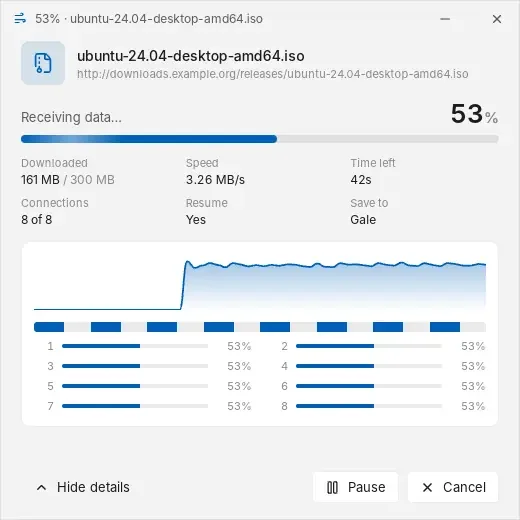
The 32 ceiling is there for the cases where it helps, mainly per-connection throttling on distant servers. After the 429 episode above, I'd suggest leaving it at eight or lower unless you know the server is fine with more. If you want to compare Gale with other tools, I tested ten of them in the best free and open-source download managers for Windows, and this post explains why I built Gale as a free IDM alternative.
A checklist if you're writing your own
If you are building a downloader, even a ten-line script like the one that got me rate-limited, these are the rules I'd enforce:
- Send a HEAD (or a
bytes=0-0GET) first. Record length, Accept-Ranges, ETag and Last-Modified. - Treat anything other than 206 with a matching Content-Range as "no range support" for that request. Never write a 200 body or an error page at an offset.
- Start with a small number of connections and back off on 429 or 503, honouring
Retry-After. - Split dynamically so idle connections take over the tail of slow ones, with a minimum segment size.
- Resume with If-Range and a strong ETag. On a 200, discard the partial file.
- Finish with a size check and, when a hash is published, a SHA-256 comparison.
FAQ
Does a download accelerator work on every website?
No. It needs a server that answers Range requests with 206 Partial Content. If the server ignores Range or sends Accept-Ranges: none, a well-behaved download manager falls back to one connection, and that download usually cannot resume after a pause.
How many connections should I use?
Start with 4 to 8. More connections only help if each one is being held back by a per-connection limit or by TCP on a long, lossy path. Many servers cap or rate-limit parallel connections, and opening 32 to a small mirror is rude.
Why did my resumed download produce a broken file?
Usually because the file on the server changed between the first and second session, or because an error page was saved as if it were file data. Resuming with If-Range and a strong ETag, checking for a 206 status and the expected Content-Range, and comparing a SHA-256 hash at the end prevents both.
Further reading
If you are choosing a tool rather than building one, my comparison of free download managers covers ten options, and the Gale vs IDM write-up goes deeper on one Windows app.
Sources
- RFC 9110: HTTP Semantics (sections 8.8, 13.1.5, 14, 15.3.7, 15.5.17)
- RFC 9112: HTTP/1.1, section 9.4 Concurrency
- RFC 9113: HTTP/2, section 9.1 and RFC 9114: HTTP/3, section 3.3
- RFC 5681: TCP Congestion Control and RFC 6928: Increasing TCP's Initial Window
- Mathis, Semke, Mahdavi, Ott (1997), The Macroscopic Behavior of the TCP Congestion Avoidance Algorithm, ACM SIGCOMM CCR 27(3)
- Hacker, Athey, Noble (2002), The End-to-End Performance Effects of Parallel TCP Sockets on a Lossy Wide-Area Network, IPDPS
- Allcock et al. (2005), The Globus Striped GridFTP Framework and Server, SC'05
- MDN: HTTP range requests
- curl manual (
-r/--range,-C/--continue-at,-I) - aria2c manual (
--split,--min-split-size)