If you want an IDM alternative that costs nothing and whose code you can read, this post is about Gale Download Manager, a free, open-source download manager for Windows 10 and 11. Full disclosure up front: Gale is my own project. I wrote it, I maintain it, and I have every reason to make it look good. Read this as a comparison written by an interested party, and check the official sources linked throughout; every IDM price and feature below comes from Internet Download Manager's own pages.
Short version: Gale covers the core jobs people buy IDM for. That means multi-connection downloads, resuming broken downloads, taking over downloads from Chrome and Edge, saving videos, and scheduled queues. It is also at version 0.6.0, is best tested on Windows (Linux packages exist, the macOS build is untested), supports only Chromium-based browsers, and has rough edges a mature commercial product doesn't.
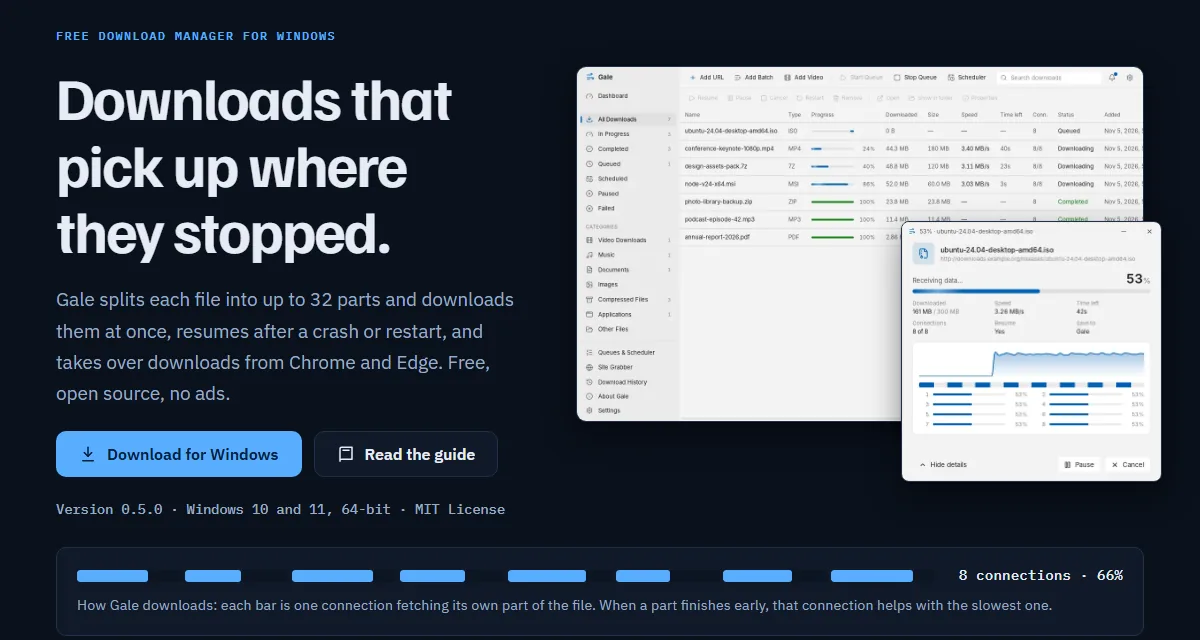
What people actually use IDM for
I've watched friends, clients and family use IDM for years, and almost nobody touches more than five features:
- Segmented acceleration. IDM splits a file into parts and fetches them over several connections at once. Its own FAQ tells broadband users to raise "Default max. conn. number" to 16 or 32 when downloads feel slow (IDM support FAQ on slow downloads).
- Browser integration. Click a link in the browser and IDM grabs it instead of the browser's own downloader.
- Video grabbing. The little download button over a video player is, for many people, the whole reason IDM is installed.
- Scheduling. Queue big files for the night, let the PC shut down afterwards.
- Resume. A dropped Wi-Fi connection or a restart shouldn't throw away 3 GB of a 4 GB ISO.
IDM's features page also lists a site grabber, download categories, a download quota (a cap in megabytes per hour), a wide range of proxy types including Microsoft ISA and FTP proxies, and support for HTTP, HTTPS, FTP and MMS (IDM features). That's a long list, and some of it (MMS streams, Kerberos proxy auth) matters to very few home users.
What IDM costs, and how the trial works
I checked IDM's official purchase page on , with the currency set to USD (IDM registration page). The page picks a currency based on where you are. From Saudi Arabia it first showed prices in riyals, so your local price may differ.
| IDM licence | Price (USD, 8 Nov 2026) |
|---|---|
| One-year licence, 1 PC | $11.95 |
| Lifetime licence, 1 PC | $24.95 |
| One-year licence, 2 or more PCs | $9.95 per PC |
| Lifetime licence, 2 or more PCs | $19.95 per PC |
The trial is 30 days, and the purchase page says plainly that you should uninstall the trial once it ends if you don't register (IDM download page). IDM's licensing FAQ adds the details that matter. A one-year licence stops working after a year and asks for a new key. A lifetime licence never expires and keeps working even if you stop paying for updates. Purchases made after 1 April 2016 include three years of free updates, after which updates are a paid subscription (IDM licence FAQ).
$24.95 for a lifetime licence is not much money for a tool you use daily, and the product is actively maintained. Its news page lists version 6.43 Build 18 as released on 4 November 2026, with builds 15 and 12 in October (IDM release history). If price were the only issue, I'd tell most people to just buy it.
Price isn't the only issue, though. Search for IDM and you'll find plenty of sites offering "cracked" or "activated" copies. Running a patched closed-source binary from one of those, with hooks into your browser, is a security problem dressed up as a saving. A free tool with public source code removes the reason to go looking for one.
How Gale works, briefly
Gale's download engine is written in Rust, and the Windows app uses Tauri with a React interface (Gale source on GitHub). The part that does the speeding up is the same idea IDM uses. HTTP lets a client ask for a byte range of a file instead of the whole thing (RFC 9110, range requests). Gale opens up to 32 connections, gives each one its own range, and writes the parts into the same file. Many servers cap the speed of each connection, so several connections together use more of your line.
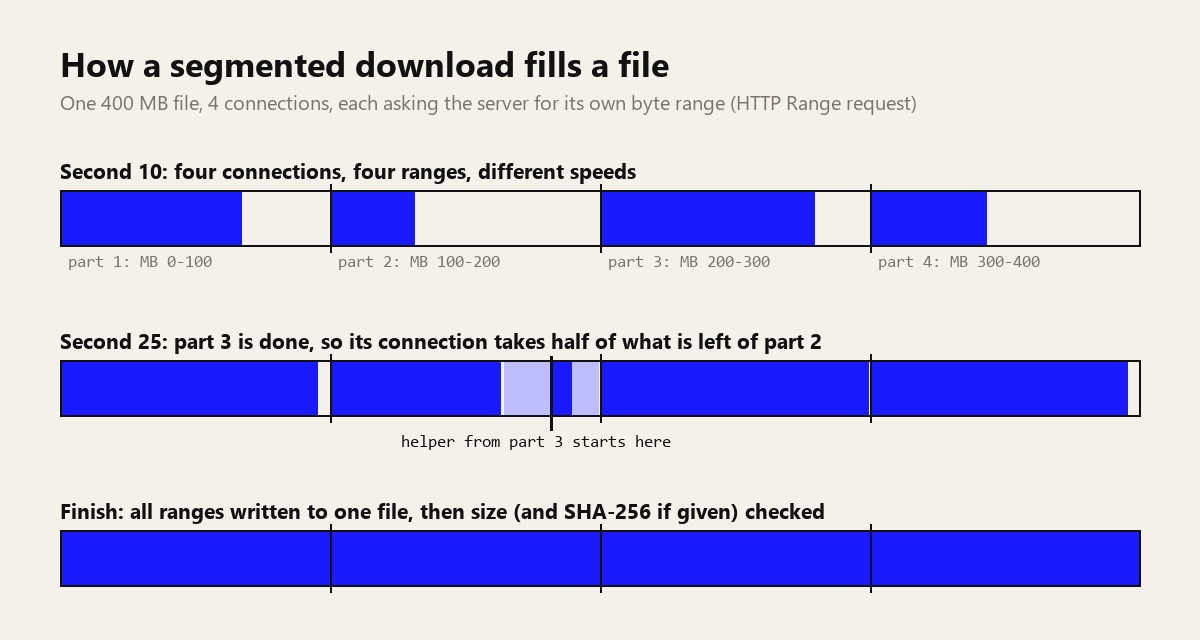
Two details matter more than the connection count. First, when a part finishes early, that connection splits the slowest remaining part and helps with it, so one slow range doesn't hold up the whole file. Second, before resuming, Gale checks that the file on the server hasn't changed (the README mentions If-Range/ETag protection). Without that check, a resumed download can quietly stitch half of an old file onto half of a new one. If the server doesn't allow range requests at all, Gale falls back to one connection, and a paused download from that server has to start over. No download manager can get around that; it's the server's decision.
When a download completes, Gale checks the size, and if you paste a SHA-256 checksum from the publisher's site it marks the file complete only when the hash matches. If you want to understand what that check proves, I wrote about SHA-256 and other hash functions separately, and you can hash a short string in the browser with my hash generator to see how the output looks.
Gale vs IDM, feature by feature
IDM facts come from its official pages as of 8 November 2026. Gale facts come from the Gale site, guide and README; the table was written for version 0.5.0 and the changes in 0.6.0 are noted below it.
| Feature | IDM 6.43 | Gale 0.5.0 |
|---|---|---|
| Price | 30-day trial, then $11.95/year or $24.95 lifetime (1 PC) | Free for personal and commercial use, no trial, no paid tier |
| Source code | Closed | Open, MIT License |
| Connections per file | Up to 32 (FAQ suggests 16 or 32 on broadband) | 1 to 32, default 8 |
| Resume after crash or restart | Yes | Yes, with a server-side change check; auto-resume on start |
| Browsers | Edge, Chrome, Firefox, Opera and many others | Chrome and Edge 116+ only |
| Extension install | From the browser's add-on store | Load unpacked in Developer mode (about a minute) |
| Protocols | HTTP, HTTPS, FTP, MMS | HTTP, HTTPS, BitTorrent (magnet and .torrent); no FTP |
| Video | Download panel on web players | Quality menu on videos (1080p, 720p, 360p, audio as MP3), HLS and DASH, via yt-dlp and FFmpeg |
| DRM-protected video | No | No, and it doesn't try |
| Queues and scheduler | Yes, plus shutdown and periodic sync | Yes: once, daily, weekdays, weekly; shutdown with 60-second cancel |
| Speed control | Download quota (MB per hour) | Total and per-download limits; tray presets |
| Site grabber | Yes, can be scheduled | Yes, respects robots.txt, link depth and filters |
| Proxy | Many types, Basic/NTLM/Kerberos auth | HTTP, HTTPS, SOCKS5; password in Windows Credential Manager |
| Checksum check | Not listed on the features page | SHA-256 if you supply one |
| Virus scan after download | Runs your chosen antivirus | Optional Microsoft Defender scan |
| Updates | Frequent builds; lifetime licence includes 3 years of updates | Free; since 0.6.0 Gale checks GitHub on start and can install the new MSI after verifying its SHA-256 (Windows) |
Where Gale is behind (the honest list)
- Windows first. Windows 10 (version 1809 or later) and Windows 11, 64-bit, is where I test. Version 0.6.0 adds a .deb and an .rpm for Linux, which I installed and ran on one Linux machine. A macOS .dmg is built by GitHub Actions and has not been tested on a Mac.
- Young software. Versions 0.1.0 to 0.6.0 all shipped in November 2026. The changelog is short because the project is new. Expect bugs IDM fixed a decade ago.
- Chrome and Edge only. Firefox users get nothing from the browser side. Other Chromium browsers may work, but I haven't tested them.
- The extension isn't in a store yet. You load it from Gale's install folder with Developer mode switched on. It works, and Gale updates it when you install a new version, but it's an extra step that IDM doesn't need.
- No DRM video, no live streams, no playlists. Netflix and most paid streaming services are out, by design.
- No FTP, no auto-update, English only. To update, you download the new setup and run it; it keeps your list and settings.
- Unsigned installer. Code signing costs money I haven't spent yet, so Microsoft Defender SmartScreen shows "Windows protected your PC" on first run. The download page publishes the SHA-256 of each installer so you can check the file yourself.
- Size. The setup is 163 MB and needs about 400 MB of disk, mostly because it bundles yt-dlp and FFmpeg for video.
Where Gale matches IDM, or does a bit more
On the jobs from the first section, Gale does the work. Downloads use up to 32 connections. Unfinished downloads resume by themselves when Gale starts, and downloads that failed because the connection dropped get retried. The browser extension catches downloads and opens a Download File Info window where you pick the name, category and folder, or choose Download later to drop it in the queue.
Video works the way IDM users expect: hover over a video, click the blue Download button, pick a quality. Gale downloads video and audio separately and joins them without re-encoding, so there's no quality loss and no long wait while the CPU spins. It uses the open-source yt-dlp for reading video pages, and when a site changes its player you can click Update yt-dlp in Settings instead of waiting for me to ship a release.
Two things IDM's features page doesn't list: BitTorrent downloads through magnet links and .torrent files (Gale stops sharing when a torrent finishes or is paused), and a SHA-256 check before a file is marked complete. Both tools can run a virus scan when a download finishes; IDM calls an antivirus of your choice, Gale optionally uses Microsoft Defender. Gale also keeps a dashboard and a history that records how long each download took.
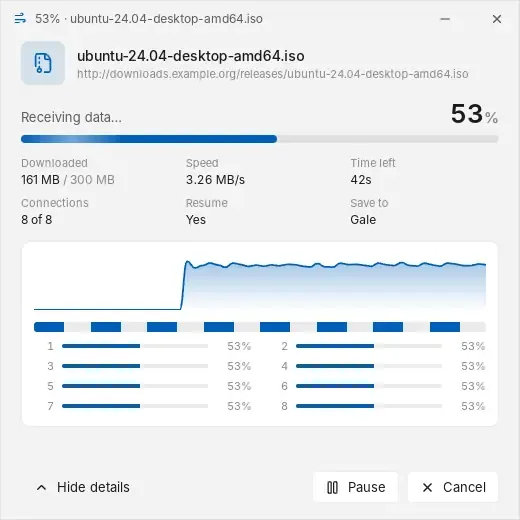
Migrating from IDM to Gale, step by step
Gale doesn't import IDM's download list, so finish or write down anything half-done in IDM first. Then work through these steps.
1. Install Gale
Download Gale_Setup_0.6.0.exe from Gale's download page. Before running it, compare its hash with the one published there:
Get-FileHash .\Gale_Setup_0.6.0.exeThe output should match 9d14334f…7c9ca (the full value is on the download page). Run the setup and approve the administrator prompt once. If SmartScreen appears, click More info, confirm the file name, then Run anyway. Gale installs to C:\Program Files\Gale for all users, and also installs Microsoft Edge WebView2 if the PC lacks it. For IT departments there's an MSI that installs silently with msiexec /i Gale_0.5.0_x64.msi /qn.
2. Turn off IDM's browser integration
Two download managers fighting over the same click is a bad time. Disable or remove the IDM Integration Module extension in Chrome or Edge, or uninstall IDM entirely once you're happy with Gale.
3. Connect the Gale extension
- Start menu, Gale folder, Install browser extension. The page that opens shows the folder,
C:\Program Files\Gale\browser-extension. - Go to
chrome://extensions(oredge://extensions) and switch on Developer mode. - Click Load unpacked, choose that folder, then pin the Gale icon. It should say Connected while Gale is running.
Leave the folder where it is; the browser loads the extension from there. Chrome explains how native messaging between an extension and a desktop app works in its native messaging documentation, which is the channel Gale uses. Nothing goes over the internet between the extension and the app.
4. The settings that matter
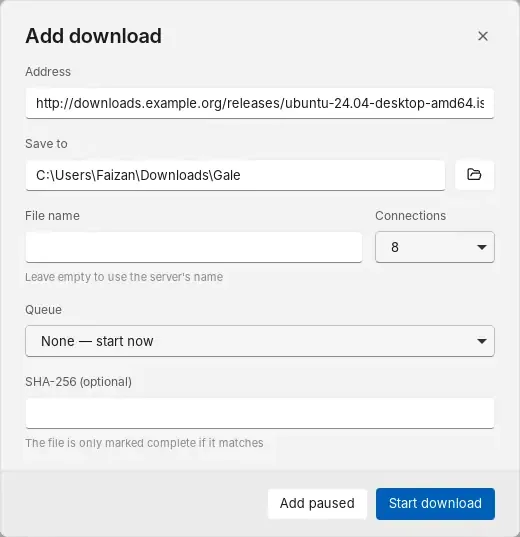
- Connections (Settings, Downloads). The default is 8, and the range is 1 to 32. On a fast fibre line, try 16. More isn't always better: some servers limit connections per client, and Gale respects that. There's also a per-server connection cap under Network.
- Categories (Settings, General). Turn on category folders and Gale sorts files into Video Downloads, Music, Documents, Images, Compressed Files, Applications and Other Files, similar to IDM. The default folder is
Downloads\Gale. - Speed limits (Settings, Network). Set a total limit and a per-download limit. For quick changes, right-click the tray icon and choose Unlimited, 256 KB/s, 1 MB/s or 5 MB/s. It applies to running downloads at once.
- Schedules (Queues and Scheduler). Edit a queue to set how many downloads run together, then Add schedule: once, daily, weekdays or weekly. Tick shutdown-when-done if you want the PC off in the morning. Gale has to be running for schedules to fire; by default it starts with Windows in the tray.
- Proxy (Settings, Network). HTTP, HTTPS or SOCKS5, with a connection test. If you used NTLM or Kerberos proxy auth in IDM on a corporate network, that's a gap; stay on IDM there.
- What the browser hands over (extension Options). Limit capture to certain file types or a minimum size, exclude sites, or skip the Download File Info window so downloads start straight away.
The privacy model
This is the part I care most about, partly because I'm a security person by trade. Gale has no account, no ads, no analytics and no telemetry, and I don't run any server for it. Your download list and settings sit in %APPDATA%\com.faizzyhon.gale on your PC. Proxy passwords go into Windows Credential Manager, not into a settings file.
According to Gale's privacy policy, the app connects only to the servers you download from, to BitTorrent peers and trackers for torrents, to your proxy if you set one, and to GitHub when you click Update yt-dlp. It does not check for updates on its own. The extension passes cookies for a single download to the app so that downloads from sites you're signed in to work; they stay in memory for that download and never touch disk or logs, and you can turn that off.
The same reasoning is behind the client-side tools on this site: if the work can happen on your machine, it should. And because the code is MIT-licensed, you don't have to take my word for any of this.
Who should stay on IDM
- Firefox and Opera users. Gale's extension is Chrome and Edge only.
- Anyone who needs FTP or MMS. Gale doesn't speak FTP.
- Corporate networks with NTLM or Kerberos proxies. IDM supports them; Gale doesn't.
- People who want zero friction. IDM's browser extension installs from the browser's add-on store, and the product has a long track record. If you already own a lifetime licence, keep it. It still works.
- Machines where unsigned software is blocked by policy. That rules Gale out until it's code-signed.
Everyone else, meaning people who mostly grab big files, ISOs, course videos and the odd torrent in Chrome or Edge, can switch and save the licence fee.
FAQ
Is Gale really free, including for work?
Yes. It's free for personal and commercial use, with no trial, no ads and no paid version. The MIT License allows use, modification and redistribution.
Can Gale resume broken downloads after a restart?
Yes, when the server supports range requests, which most do. Gale checks that the file hasn't changed on the server before it continues. If a server doesn't support ranges, Gale uses one connection and a paused download restarts.
Will Gale download from Netflix or other paid streaming services?
No. DRM-protected video can't be downloaded and Gale doesn't try. Only save videos you have the right to save.
Does Gale work on macOS or Linux?
Linux, yes since 0.6.0: a .deb (Debian, Ubuntu, Mint) and an .rpm (Fedora, openSUSE) are on the release page. A macOS .dmg is built by GitHub Actions but has not been tested on a Mac yet. Windows 10 and 11, 64-bit, is the best-tested platform.
What changed in version 0.6.0
Gale 0.6.0 came out on 15 November 2026, after the comparison above was written. The changes that matter:
- Refresh a broken link. Right-click a download whose link expired and choose Refresh download address. Paste a new link, or let Gale catch the same download from your browser. It checks the file size matches and continues where it stopped.
- Several networks at once. Tick Ethernet, Wi-Fi and a second Wi-Fi adapter in Settings. Each download's connections are shared across them, and connections from a network that drops move to the others. Each network needs its own internet gateway.
- Update check. Gale looks at GitHub when it starts (you can turn this off) and under About. On Windows it downloads the MSI, checks its SHA-256, replaces the old version and restarts.
- Linux packages. A .deb and an .rpm, with the proxy password in the system keychain and the browser helper registered with Chrome, Chromium, Edge and Brave.
- A security fix on Linux and macOS. The browser helper now only connects to a Gale owned by the same user, and on Linux only to the installed program.
The release notes and files are on GitHub.
My take
IDM is a good product at a fair price. My reason for building Gale anyway is the extension: a download manager's browser add-on sees every file you fetch and, with default settings, the cookies for those downloads. I want that piece to be code anyone can audit. The next things on my list are a store-listed extension and a signed installer, since those two remove most of the setup friction described above. If you hit a bug, open an issue on GitHub; reports from real use make it better faster than anything I can test alone. Start from the Gale website, and if you want to know who's behind it, my about page has the background. More of my free software is listed in this roundup of browser-based developer tools.
Further reading
If you want to see how Gale stacks up against the wider field, I ranked it alongside nine others in the best free and open-source download managers. For the protocol side, how download managers work explains Range requests, segments and resume with real curl output.
Sources
- Internet Download Manager: registration and prices (checked 8 November 2026)
- IDM FAQ: one-year and lifetime licences, update period
- IDM download page: 30-day trial
- IDM features
- IDM release history
- IDM FAQ: connection settings and slow downloads
- RFC 9110: HTTP Semantics (range requests)
- Chrome for Developers: native messaging
- Gale source code and README (GitHub)
- Gale user guide and privacy policy
- yt-dlp project