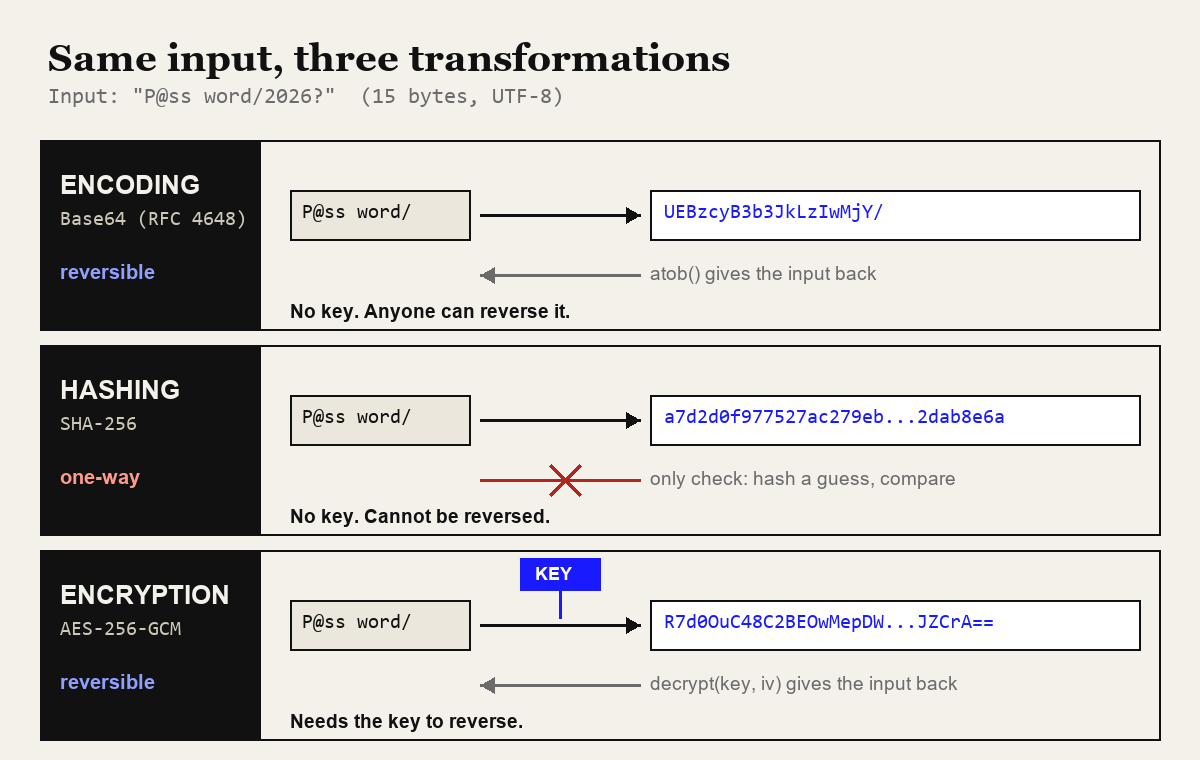
Encoding vs hashing vs encryption comes down to one question: who can get the original data back? Encoding (Base64, URL encoding) changes the format, and anyone can reverse it, because no key is involved. Hashing (SHA-256, Argon2id) is one-way: nobody reverses it, you can only hash a guess and compare. Encryption (AES-GCM) is reversible, but only for someone holding the key. So encoding is for compatibility, hashing is for verification, and encryption is for confidentiality.
That sounds like textbook material, and it is. It still gets broken in production code. As a Certified Ethical Hacker, I look at how applications store and move secrets, and the damaging problems in that area are rarely clever exploits. They are a "password" column full of Base64, a reset token that is just the user ID run through SHA-256, or a JWT carrying a customer's national ID number in a payload anyone can read. Each one comes from a developer who used one of the three tools while believing it was another.
This post does not re-explain how Base64 or SHA-256 work inside; I have separate deep dives for those, linked below. It is about telling the three apart and choosing correctly.
The same input through all three
Talk is cheap, so here are real outputs. I took the string P@ss word/2026? (15 bytes in UTF-8, with a space, a slash and a question mark on purpose) and ran it through each transformation in Node.js. You can reproduce the first three in the browser with my Base64 encoder and decoder, the URL encoder and the SHA hash generator.
| Transformation | Output | Who can reverse it |
|---|---|---|
| Base64 | UEBzcyB3b3JkLzIwMjY/ | Anyone |
| Base64url | UEBzcyB3b3JkLzIwMjY_ | Anyone |
URL encoding (encodeURIComponent) | P%40ss%20word%2F2026%3F | Anyone |
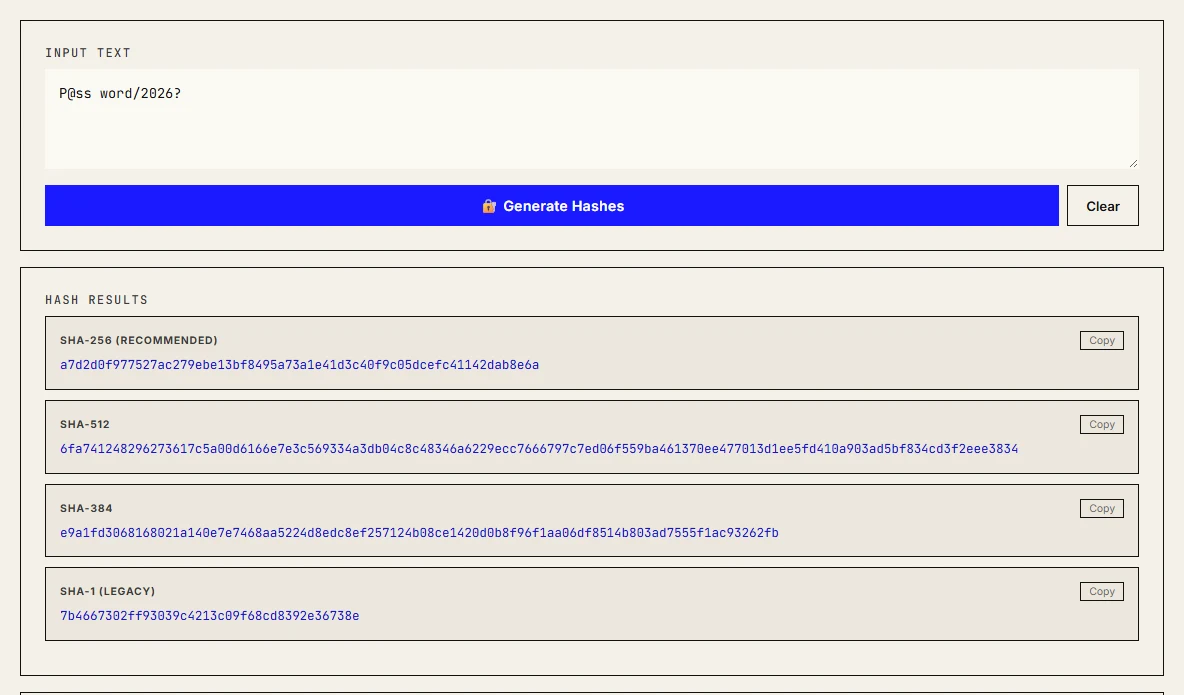
| SHA-256 | a7d2d0f977527ac279ebe13bf8495a73a1e41d3c40f9c05dcefc41142dab8e6a | Nobody (guess and compare only) |
| AES-256-GCM, demo key, 12-byte IV | R7d0OuC48C2BEOwMepDW6uORyXUjUxQ8euYgISWQrA== | Whoever holds the key |
The Base64 and Base64url outputs differ only in the last character. RFC 4648 defines both: the URL-safe alphabet in section 5 swaps + and / for - and _. Same information, different packaging, so neither is "more secure".
The URL-encoded string is still readable. Percent-encoding, defined in section 2.1 of RFC 3986, only escapes characters that would break URL syntax. Letters, digits and -._~ pass through untouched.
The SHA-256 output is always 64 hex characters, whether the input is 15 bytes or a 4 GB ISO. Change the year in my input to 2027 and the hash becomes 2ffaf0c95dd5e0ec95a50faf94effbb0bc4842ed3c18c6b6e1faba3d88f39c68, with no visible relation to the first. That size-and-shape fingerprint is the giveaway when you meet an unknown string in a database.
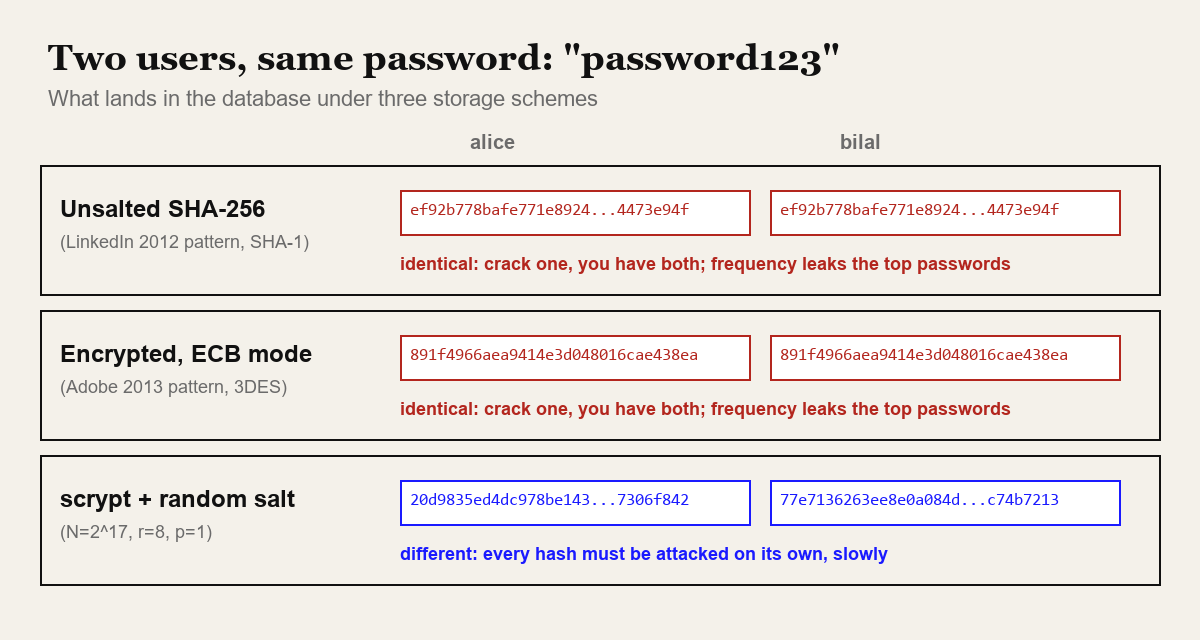
The AES-GCM ciphertext is 31 bytes: 15 bytes of encrypted data plus a 16-byte authentication tag. When I encrypted the same input again with the same key and a different IV, I got BEwbbe6nz+uDnv6TvG7xSM8TaqG04ChTT4Hv+zHW5A==. Different output every time is a property you want from encryption, and it will come up again in the Adobe story.
Encoding: making data survive the channel
Encoding exists so that data survives a channel that would otherwise mangle it. Base64 turns arbitrary bytes into 64 safe ASCII characters so binary can ride inside JSON, email or a data URI. Percent-encoding makes a space or an ampersand safe inside a query string. HTML entity encoding makes < render as text instead of starting a tag.
None of these hide anything, and the standards say so. RFC 4648's security considerations section states plainly that base encoding does not provide computational confidentiality. One line proves it:
$ echo 'UEBzcyB3b3JkLzIwMjY/' | base64 -d
P@ss word/2026?
Decoding takes no key and no computing effort. If you can see the encoded value, you have the original.
Is Base64 encryption?
No, and this is the single most common confusion I see. It usually shows up in three places:
- "Encrypted" passwords or API keys in a config file or database that turn out to be Base64. Kubernetes Secrets catch people here too: their values are Base64-encoded, and people read that as encrypted.
- HTTP Basic authentication, where the
Authorizationheader is justuser:passwordin Base64. It is only acceptable over TLS, because the encoding adds nothing. - "Obfuscated" client-side secrets in mobile apps and JavaScript bundles. Decoding is one function call away.
The practical rule: if a string ends in = or == and only uses A-Z a-z 0-9 + /, decode it before you assume anything about it.
URL encoding is not sanitisation
The second encoding mistake is subtler. A developer URL-encodes user input and believes it is now "safe". It is safe for one context only: as a value inside a URL query parameter. The OWASP XSS Prevention Cheat Sheet is explicit that output encoding is context-specific (HTML body, HTML attribute, JavaScript, CSS and URL each need their own method) and that URL encoding applies to parameter values, not whole URLs.
Two failures follow from this. First, encodeURI("javascript:alert(1)") returns the string unchanged, because every character in it is legal in a URL. Put that in an href and a click runs the script. URLs from users need an allow-list of http: and https: schemes, which is validation, not encoding. Second, decoding in more than one layer lets %253C pass a filter that decodes once and checks for <, then become < when the application decodes it a second time. A filter and an application that disagree about how many times to decode is a classic bypass.
If you want the full rules for reserved characters and encodeURI versus encodeURIComponent, my percent-encoding reference covers them. For this post, remember that encoding answers "will this survive the channel", never "is this safe".
Hashing: one-way, yet still guessable
A cryptographic hash maps any input to a fixed-size digest, and you cannot run it backwards. That makes it ideal for checking integrity: a published SHA-256 checksum lets you confirm a download was not corrupted or swapped. My hash generator does this in the browser. It computes SHA-256, SHA-384, SHA-512 and SHA-1 through the Web Crypto API's crypto.subtle.digest, hashes files locally, and has a field to paste an expected checksum for comparison. It deliberately has no MD5, because Web Crypto does not provide it.
Hashing vs encryption for secrets
A hash cannot be reversed, but its input can be guessed. If the input comes from a small or predictable set, an attacker hashes every candidate and looks for a match. Passwords are the obvious case. A less obvious one is "anonymised" data: there are only so many 11-digit phone numbers or 13-digit national ID numbers, and fast hashes like SHA-256 can be computed billions of times per second on a GPU, so the whole input space can be enumerated. For those, a keyed hash (HMAC with a secret kept outside the database) or real pseudonymisation is the right tool.
The same thinking applies to tokens. A password-reset token built as sha256(user_id + timestamp) is predictable, because the attacker knows or can guess both inputs. Tokens need randomness from a CSPRNG such as crypto.getRandomValues(), not a hash of known values.
Password hashing: what OWASP and NIST say now
Fast hashes are the wrong tool for passwords precisely because they are fast. The OWASP Password Storage Cheat Sheet recommends deliberately slow, salted functions. The current minimums I checked while writing this:
- Argon2id (first choice): for example m=19456 (19 MiB), t=2, p=1, or m=47104 (46 MiB), t=1, p=1. OWASP lists five equivalent memory and iteration trade-offs.
- scrypt: for example N=2^17 (128 MiB), r=8, p=1.
- bcrypt, for legacy systems: work factor 10 or more, and remember most implementations only use the first 72 bytes of input.
- PBKDF2, where FIPS compliance is required: 600,000 iterations with HMAC-SHA-256.
NIST SP 800-63B-4, finalised in July 2025, lines up with this. Passwords must be salted and hashed with a suitable password hashing scheme, the salt must be at least 32 bits, and the cost factor should be as high as practical and raised over time. It also recommends an extra keyed step with a secret known only to the verifier, which is what OWASP calls a pepper. The same document requires at least 15 characters for passwords used as a single factor and forbids composition rules such as "one uppercase, one symbol".
My password security guide for web teams covers the policy side; here the point is narrower. A password column should contain output from one of those four functions, with the algorithm and parameters stored next to it so you can upgrade later.
Encryption: reversible, if you hold the key
Encryption is the only one of the three that provides confidentiality while letting an authorised party get the data back. Use it when you genuinely need the original value later: a third-party API key your server must send, a document stored for a user, a database field your support staff must read.
In the browser and in Node.js, the Web Crypto API's SubtleCrypto.encrypt() gives you AES-GCM, which is authenticated: decryption fails loudly if anyone altered the ciphertext. It is only available in secure contexts (HTTPS). This is roughly the code that produced my table row:
const key = await crypto.subtle.generateKey(
  { name: "AES-GCM", length: 256 }, false, ["encrypt", "decrypt"]);
const iv = crypto.getRandomValues(new Uint8Array(12));   // new IV every time
const data = new TextEncoder().encode("P@ss word/2026?");
const ct = await crypto.subtle.encrypt({ name: "AES-GCM", iv }, key, data);
// store iv + ct together; the iv is not secret, but it must be unique
For the table I used a fixed demo key and IV so the output is reproducible. Never do that in production. MDN's AesGcmParams page puts the rule bluntly: never reuse an IV with the same key. The IV can travel in the clear next to the ciphertext; it just has to be unique. The harder part of encryption is key management: where the key lives, who can read it, and how you rotate it. A key sitting in the same database as the ciphertext gives you very little.
Why encrypted passwords failed at Adobe
Adobe's 2013 breach shows what happens when encryption is used where hashing belonged. CSO Online reported that Adobe confirmed the stolen passwords, from a backup system due for decommissioning, were encrypted with Triple DES rather than hashed. Researcher Jeremi Gosney counted 130,324,429 affected accounts. The system used ECB mode with one key for every password, so identical passwords produced identical ciphertext. Combined with plaintext password hints, that was enough to work out the most common passwords without ever recovering the key. "123456" alone covered close to 1.9 million accounts.
LinkedIn made the hashing version of the same mistake. Its 2012 breach was first reported as 6.5 million password hashes, and Krebs on Security reported in 2016 that LinkedIn believed a 117 million record dump came from the same incident. The passwords were stored as SHA-1 with no salt: fast to compute, identical for identical passwords, and easy to attack with precomputed tables.
The JWT trap: signed is not secret
JSON Web Tokens mix all three ideas in one string, which is why they confuse people. Here is a token I signed with HS256 and a demo secret:
eyJhbGciOiJIUzI1NiIsInR5cCI6IkpXVCJ9.eyJzdWIiOiIxMDQyIiwiZW1haWwiOiJhbGlAZXhhbXBsZS5jb20iLCJyb2xlIjoiYWRtaW4ifQ.hbg3KLSy0jX3sBTGlm_4Rs4DGnoa0ufWLDuXcmPTmiIThe middle segment base64url-decodes to {"sub":"1042","email":"ali@example.com","role":"admin"}. No secret needed. Paste the token into the JWT inspector tab of my Base64 tool and you will see the same thing. RFC 7519 describes each part as a base64url-encoded value, and its privacy section says that if a JWT contains privacy-sensitive information, you must take measures to prevent disclosure, such as an encrypted JWT.
So the header and payload are encoded, the signature is a keyed hash (HMAC-SHA-256 here) that stops tampering, and nothing is encrypted. Treat the payload as public. Put a user ID and roles in it, never a national ID number, a medical code or an internal API key. If you need confidentiality, use JWE or keep the data server-side.
Which one do I need? A decision table
When I review a design, I ask what must be true after the transformation, then pick from this table.
| You need to… | Use | Example | Not this |
|---|---|---|---|
| Send binary through a text-only channel | Encoding | Base64 for an image in JSON | Encryption "to make it text" |
| Put user data in a URL parameter | Encoding | encodeURIComponent(value) | Treating it as XSS protection |
| Show user input in HTML | Context-aware output encoding | HTML entity encoding | URL encoding or Base64 |
| Store user passwords | Password hashing | Argon2id, scrypt, bcrypt | SHA-256, MD5, AES, Base64 |
| Verify a file was not corrupted | Hashing | SHA-256 checksum | MD5 when tampering matters |
| Prove a message came from someone holding a secret | Keyed hash | HMAC-SHA-256 on webhooks | sha256(secret + message) |
| Store data you must read back later | Encryption | AES-256-GCM with a managed key | Base64 or a reversible "custom" scheme |
| Issue a reset or session token | Random generation | crypto.getRandomValues() | Hash of user ID and time |
Common mistakes checklist
Run through this on your next code review. Each line is a pattern that turns a database leak into a credential leak.
- A value described as "encrypted" decodes with
base64 -d. - Passwords stored with MD5, SHA-1 or SHA-256, salted or not, instead of Argon2id, scrypt, bcrypt or PBKDF2.
- Passwords stored with reversible encryption "so support can tell users their password".
- One global salt for every user, which behaves like no salt for identical passwords.
- bcrypt fed long passphrases without accounting for the 72-byte limit.
- URL encoding or Base64 used as the defence against XSS or SQL injection.
- User-supplied URLs placed in
hrefwithout anhttp/httpsallow-list. - Sensitive data in a JWT payload on the assumption that the signature hides it.
- AES-GCM with a hard-coded or repeated IV, or the key stored next to the ciphertext.
- "Anonymised" identifiers that are a plain SHA-256 of a phone number or email.
- Tokens built by hashing predictable values instead of drawing from a CSPRNG.
- Hash comparison with
==instead of a constant-time compare for secrets such as HMAC signatures.
For generating the test passwords you use while checking this, the password generator on this site uses crypto.getRandomValues(), the same CSPRNG your token code should use.
FAQ
Is Base64 encryption?
No. Base64 is an encoding with a public, fixed alphabet and no key. Anyone can decode it with atob() or base64 -d. RFC 4648 states that base encoding does not provide computational confidentiality.
Can a SHA-256 hash be decrypted?
No, there is nothing to decrypt. An attacker can only guess inputs, hash each guess and compare. That is why short or common inputs such as passwords, phone numbers and ID numbers can still be recovered from a plain SHA-256 hash.
Should I hash or encrypt user passwords?
Hash them with a slow, salted password hashing function: Argon2id, scrypt or bcrypt, following the OWASP Password Storage Cheat Sheet. Encrypt only when the system truly needs the original value back, which a login check never does.
Is the payload of a JWT encrypted?
Not in a normal signed JWT. The header and payload are base64url-encoded JSON that anyone holding the token can read. The signature stops tampering, not reading. Use an encrypted JWT (JWE) or keep sensitive data out of the token.
How I find these mistakes in a codebase
Most of the bugs in this post come from naming. A function called encryptPassword() that calls btoa(), a column called password_hash that holds AES output. So when I review code, I skip the function names and grep for the calls themselves: btoa, base64, createHash, md5, sha1, createCipheriv, subtle.encrypt. Each hit gets traced to where its output is stored or sent. A createHash('sha256') that ends up in a password column, or a createCipheriv whose key is read from the same table, is quick to find this way, and it decides how bad things get if the database ever leaks.
If you want the internals behind each piece, read how SHA-256, MD5 and HMAC differ and where Base64 helps in real API work. If you would like a second pair of eyes on how your application stores secrets, that is part of the security work I describe on my services page.
Further reading
The same thinking applies to moving files around safely: how print shops can receive files without WhatsApp or USB looks at a real file-transfer threat model.
Sources
- OWASP Password Storage Cheat Sheet
- NIST SP 800-63B-4: Authentication and Authenticator Management
- RFC 4648: The Base16, Base32, and Base64 Data Encodings
- RFC 3986: Uniform Resource Identifier (URI): Generic Syntax
- RFC 7519: JSON Web Token (JWT)
- MDN: SubtleCrypto.encrypt()
- MDN: AesGcmParams
- OWASP Cross Site Scripting Prevention Cheat Sheet
- CSO Online: Adobe confirms stolen passwords were encrypted, not hashed (2013)
- Krebs on Security: As scope of 2012 breach expands, LinkedIn to again reset passwords (2016)