If you want the best free download manager for Windows in 2026 and don't want to pay for Internet Download Manager, here is the short answer. Get Xtreme Download Manager (XDM) for everyday browser downloads and video. Get Motrix if you also want torrents in the same app. Get JDownloader 2 if you pull files from file-hosting sites. All three are free, and XDM and Motrix are open source.
Below are ten options, each checked against its official website and GitHub repository on 8 November 2026: license, latest stable release, platforms, and the drawbacks.
Disclosure: one of the ten, Gale, is my own project. I built it, I publish it under the MIT license, and I make no money from it. I ranked it by the same criteria as the others, which is why it is not at the top.
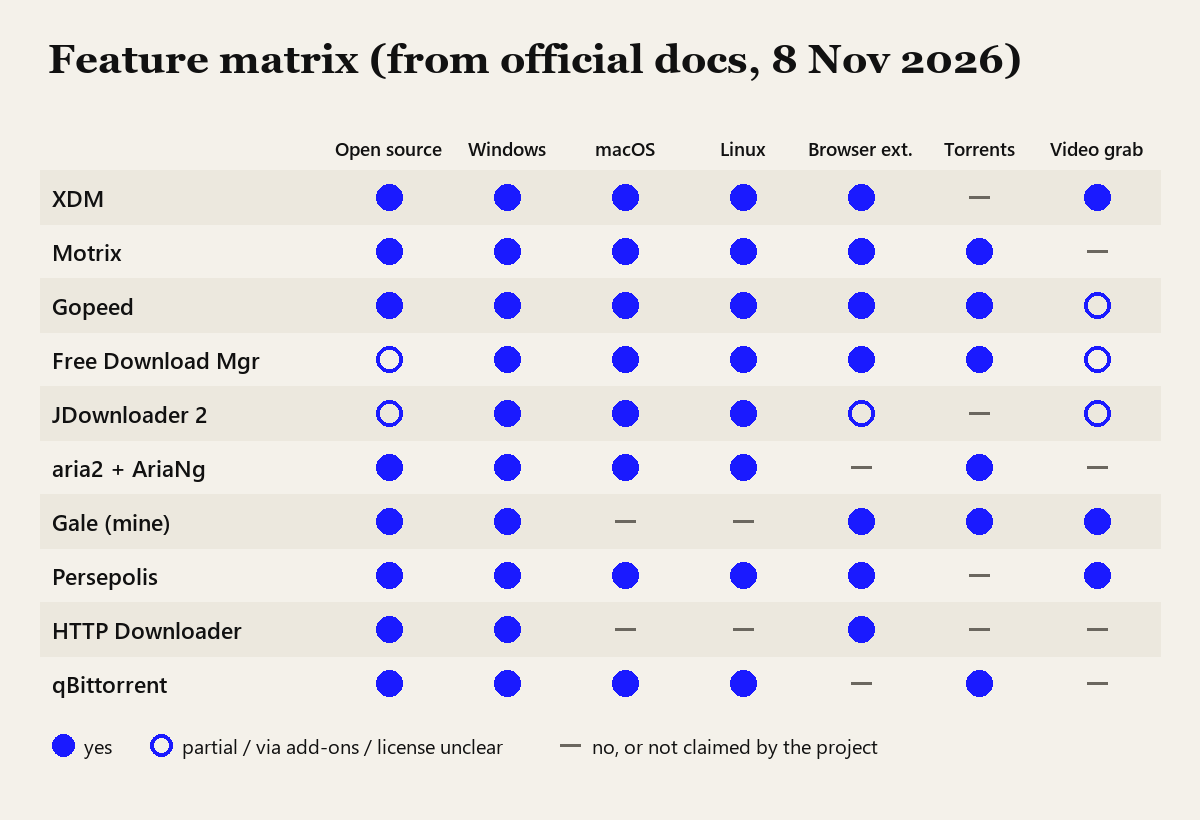
How I picked and checked these
I did not install and benchmark all ten apps for this article. Here is what I checked instead:
- Latest stable release and date from the GitHub releases API, or from the official download and news pages for FDM and JDownloader.
- Licenses from GitHub's license detection, falling back to the license file or source headers (Motrix's LICENSE is MIT; HTTP Downloader's source headers say GPL version 3).
- Features from each README or official feature page. If a project doesn't claim a feature, I mark it as no.
- Bundled offers and warnings from each official download page.
- Gale is the only one I know from the inside, because I wrote it.
My ranking criteria, in order of weight:
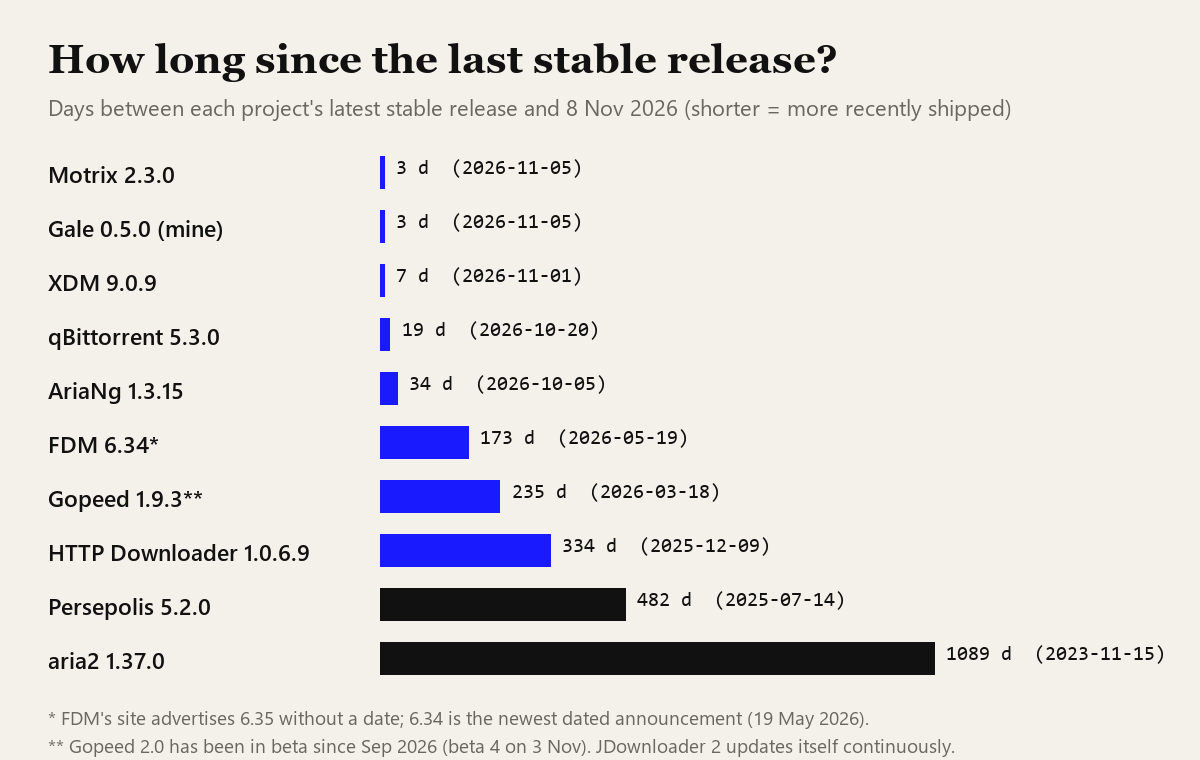
- Is it still maintained? A download manager talks to browsers, servers and TLS libraries that change every few months. An abandoned one breaks quietly.
- Is it really free, and is the source open? Open source with a clear license ranks above freeware.
- Windows experience: a proper installer, a browser extension that takes over downloads, and resume after a restart.
- Features: torrents, video and stream saving, a scheduler, speed limits.
- Track record: years of releases, no bundleware, and how the project handled past incidents.
What a download accelerator actually does
Most download managers do one core trick. HTTP lets a client ask for part of a file with a Range header, which is defined in RFC 9110, section 14. A download manager opens several connections, asks each one for a different byte range, and stitches the pieces together. If the server caps speed per connection, eight connections can pull more than one. If the server ignores range requests, or your line is already full, extra connections gain you nothing.
The part that pays off every time is resume. When Wi-Fi drops at 93% of a 4 GB ISO, the browser often starts over. A download manager asks only for the bytes it is missing. For me that alone justifies installing one.
Comparison table: the 10 best free download managers
| # | App | License | Platforms | Latest stable | Torrents | Browser add-on |
|---|---|---|---|---|---|---|
| 1 | XDM | GPL-3.0 | Win, macOS, Linux | 9.0.9 · 1 Nov 2026 | No | Chrome, Firefox, Edge |
| 2 | Motrix | MIT | Win, macOS, Linux | 2.3.0 · 5 Nov 2026 | Yes | Chrome, Edge, Firefox |
| 3 | Gopeed | GPL-3.0 | Win, macOS, Linux, Android, iOS | 1.9.3 · 18 Mar 2026 | Yes | Chrome, Edge, Firefox |
| 4 | Free Download Manager | Freeware (no license found for v6) | Win, macOS, Linux, Android | 6.34 · 19 May 2026 (6.35 undated) | Yes | Chrome, Firefox, Edge |
| 5 | JDownloader 2 | Partly open source | Win, macOS, Linux (Java) | Rolling self-updates | No | Not on download page |
| 6 | aria2 + AriaNg | GPL-2.0 / MIT | Win, macOS, Linux | 1.37.0 · 15 Nov 2023 | Yes | No (third-party only) |
| 7 | Gale (mine) | MIT | Windows 10/11 64-bit | 0.5.0 · 5 Nov 2026 | Yes | Chrome, Edge |
| 8 | Persepolis | GPL-3.0 | Win, macOS, Linux, BSD | 5.2.0 · 14 Jul 2025 | No | Yes |
| 9 | HTTP Downloader | GPL-3.0 | Windows | 1.0.6.9 · 9 Dec 2025 | No | Firefox, Chrome, Edge |
| 10 | qBittorrent | GPL | Win, macOS, Linux, FreeBSD | 5.3.0 · 20 Oct 2026 | Torrents only | No |
The 10 best free download managers, ranked
1. Xtreme Download Manager (XDM): the best IDM alternative for most people
XDM is the closest free match to what people use IDM for. Its browser extension for Chrome, Firefox and Edge takes over downloads automatically and lists videos it finds on a page. It splits files across multiple connections and resumes broken downloads.
Version 9.0.9 came out on 1 November 2026, with MSI installers for Windows x64 and ARM, macOS builds for Apple Silicon and Intel, and Linux packages. Details from the README I liked:
- HLS and DASH stream downloads with a choice of quality and audio track, muxed to MP4 without needing ffmpeg, and subtitles saved as
.srt. - A right-click "Download all with XDM" that grabs every PDF, image or video on a page.
- A headless command-line mode for scripts.
- Finished files keep the Windows Mark-of-the-Web, so SmartScreen still checks what you downloaded. You can switch this off, but I wouldn't.
The catch: no BitTorrent. The README also warns that copies on other websites are not official. Download it from xtremedownloadmanager.com or GitHub releases only.
2. Motrix: best if you want torrents and HTTP in one app
Motrix is an MIT-licensed desktop app that handles HTTP, FTP, BitTorrent and magnet links. Under the hood it runs aria2; the 2.3.0 release notes mention a bundled "aria2 1.37.0-motrix.23". So Motrix is, among other things, the friendliest aria2 GUI on this list.
GitHub shows six releases between 25 October and 5 November 2026, from 2.0.1 to 2.3.0. Version 2 added an official extension for Chrome, Edge and Firefox, a motrix command-line client, sessions that survive a restart, per-file selection inside torrents, and a self-hosted Motrix Server.
That pace has a cost: the README tells you to back up your profile before upgrading. Motrix also doesn't claim video grabbing from streaming sites.
3. Gopeed: best cross-platform pick, including phones
Gopeed (GPL-3.0) is written in Go with a Flutter interface, and it is the only option here with official builds for Windows, macOS, Linux, Android and iOS. It handles HTTP, BitTorrent, magnet links and even ed2k. Its BitTorrent side is serious: DHT, uTP, web seeds, and ratio or time limits for seeding.
Instead of hard-coding video sites, Gopeed has JavaScript extensions that add sources such as video platforms or cloud storage. It also has a REST API and a CLI.
My hesitation is the release state. The latest stable version, 1.9.3, is from 18 March 2026. Version 2.0 has been in beta since September (beta 4 landed on 3 November). If you want the newest features you'll be running a beta.
4. Free Download Manager (FDM): the most complete freeware option
FDM covers the most ground of any free app here. It runs on Windows, macOS, Linux and Android, includes a BitTorrent client, splits downloads into sections, has a scheduler and traffic modes, and integrates with Chrome, Firefox and Edge. The site says it is "100% free" with no ads.
Two things kept it out of the top three. First, licensing: the features page calls FDM open source, but that sentence sits in a section about version 3.9. I couldn't find a public repository or license for version 6, so I list it as freeware. Second, in 2023 Kaspersky reported a supply-chain attack in which some Linux visitors to FDM's official site were redirected to a backdoored Debian package. The maintainers acknowledged that this affected some users who downloaded the Linux version between 2020 and 2022. It was Linux-only and it's fixed, but it is the strongest argument I know for checking hashes even on official sites.
5. JDownloader 2: best for file-hosting sites
JDownloader 2 is built for grabbing many links at once rather than single browser downloads. The homepage lists start, stop and pause, bandwidth limits and automatic archive extraction, and describes the program as an easy-to-extend framework. Those plugins are why people use it for file-hosting sites. It runs on Java and updates itself continuously instead of shipping numbered releases.
There are installers for Windows x64, ARM64 and x86, several macOS builds, a Linux installer that uses your system Java, and a JAR that runs anywhere. The project calls itself open source. Wikipedia describes the license as GPLv3 with some parts closed, and I couldn't confirm the current terms on the official site, so I mark it as partly open source.
Look carefully at the download page. It has a separate heading for the "optional software offers-free installer". Pick that one. The interface is also busy, and running a JVM in the background costs more memory than a native app.
6. aria2 with AriaNg: best for power users and servers
aria2 (GPL-2.0) is a command-line downloader for HTTP(S), FTP, SFTP, BitTorrent and Metalink. It is the engine inside Motrix. A typical segmented download looks like this:
aria2c -x 8 -s 8 https://example.com/ubuntu.iso-x sets the maximum connections per server and -s sets how many pieces the file is split into. If you'd rather click than type, run aria2 as a background service with aria2c --enable-rpc --rpc-secret=pick-a-long-token and point AriaNg at it. AriaNg is an MIT-licensed web front end that talks to aria2 over its RPC interface. Its latest release, 1.3.15, came out on 5 October 2026.
Two drawbacks. aria2's last tagged release is 1.37.0 from 15 November 2023, although the repository still had commits in June 2026. There is no official browser extension, so you either copy links or rely on a third-party add-on.
7. Gale: my own Windows download manager
Again: Gale is my project, so weigh what I say accordingly. I built it because I wanted something that felt like IDM, was fully open source, and didn't phone home.
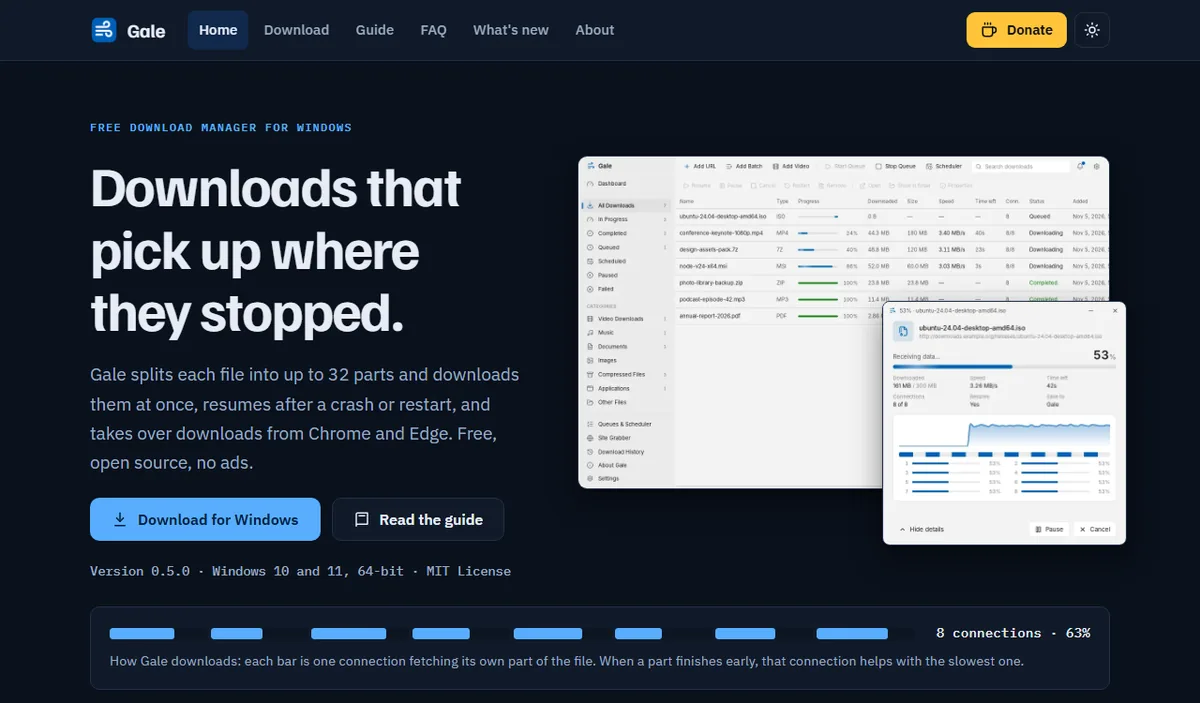
What it does today, version 0.5.0, released 5 November 2026:
- Splits each file into up to 32 parts. When one part finishes early, its connection moves over to help the slowest part.
- Resumes after a pause, a crash or a restart, and retries dropped downloads on its own at 15 s, 30 s, 1, 2 and 4 minutes.
- Takes over downloads from Chrome and Edge through its extension.
- Magnet links and
.torrentfiles, added in 0.5.0. - Lists video qualities on a page, handles HLS and DASH streams, and can save audio as MP3. It does not touch DRM-protected video.
- Queues, a scheduler that can shut the PC down (with a 60-second cancel window), SHA-256 checks, and HTTP, HTTPS and SOCKS5 proxies.
- No account, ads or analytics. The source is on GitHub, written in Rust.
Why it's seventh and not first: its first public release was on 4 November 2026. It has no track record yet, it runs only on 64-bit Windows 10 and 11, and there is no Firefox extension. XDM and Motrix have years of users finding their bugs, and Gale has days. If you try it, I'd like to hear what breaks on the GitHub issues page.
8. Persepolis: a solid GUI with yt-dlp video support
Persepolis (GPL-3.0) is a Python download manager for Linux, the BSDs, macOS and Windows. It downloads with up to 64 connections, schedules downloads, has browser add-ons, and saves video through yt-dlp and FFmpeg.
The latest release, 5.2.0, is from 14 July 2025, and the last commit I saw was in October 2025. It's slow, not dead.
9. HTTP Downloader: the lightweight, portable choice
HTTP Downloader is a small Win32 app by a single developer, licensed GPL-3.0. Its project page says each download can be split into 100 parts, and it supports HTTP(S), FTP(S) and SFTP, HTTP and SOCKS proxies, and a --portable switch that keeps settings next to the executable. Extensions exist for Firefox, Chrome and Edge, but you have to enable the app's built-in web server for them to connect.
It is Windows only, with no torrents or video, and a plain interface. The latest release is 1.0.6.9 from 9 December 2025. If you want something you can run from a USB stick on a locked-down PC, this is the one.
10. qBittorrent: for torrents only
qBittorrent is not a general download manager. It belongs here because three of my picks (XDM, Persepolis and HTTP Downloader) don't do torrents. It is GPL-licensed, runs on Windows, Linux, macOS, FreeBSD and OS/2, lists "No Ads" as a feature, and aims to be an open-source alternative to µTorrent. Version 5.3.0 came out on 20 October 2026. Pair it with XDM and you have covered nearly everything.
Didn't make the list
- uGet: I liked it for years, but its newest stable files on SourceForge (2.2.3) date from around 2019 and 2020. That is too long for software that has to keep up with browsers.
- Folx: it has a free tier, but it is a macOS app, and this is a Windows list.
- Internet Download Manager: it works well, but it is paid software with a trial, so it doesn't belong in a list of free tools.
Best free download manager by use case
- Replacing IDM on Windows: XDM.
- HTTP and torrents in one window: Motrix, or FDM if you don't mind freeware.
- Same app on PC and phone: Gopeed.
- File-hosting sites and link lists: JDownloader 2, with the offers-free installer.
- Servers, NAS or scripts: aria2, with AriaNg if you want a web UI.
- Portable, no install: HTTP Downloader.
- Windows-only, MIT-licensed, no telemetry: Gale, if you're fine with a young project.
How to install a download manager safely
A download manager sits between your browser and everything you download, which makes a fake one an attractive piece of malware. As someone who works in security, these are the habits I'd ask anyone to keep:
- Use the official source only. That means the project's own domain or its GitHub releases page. XDM's README warns about copies on other sites, and download portals often wrap installers in their own setup program.
- Read every installer screen. With JDownloader, choose the offers-free installer. With anything else, untick extra software you didn't ask for.
- Check the hash when it's published. Gale ships a
.sha256file next to each installer. In PowerShell, runGet-FileHash .\Gale_Setup_0.5.0.exe -Algorithm SHA256and compare the result. You can also drop the file into my browser-based SHA-256 hash generator, which hashes locally without uploading anything. If you want to know why SHA-256 and not MD5, I explained it in my guide to hash functions. - Install the browser extension from the project's link. These extensions can see every download you start. Follow the link in the official README or site, not a store search result with a similar name.
- Keep it updated, and drop it if it stops updating. By the maintainers' own account, the FDM incident above ran from 2020 to 2022.
- Respect the content. A video grabber doesn't change copyright. Download only what you're allowed to keep.
If you care about tools that keep your data on your own machine, I wrote more about that in why client-side tools are better for privacy.
FAQ
What is the best free IDM alternative?
For most Windows users, Xtreme Download Manager (XDM). It is GPL-3.0 open source, takes over downloads from Chrome, Firefox and Edge, splits files across several connections and saves HLS and DASH video streams. It had a stable release on 1 November 2026.
Which free download manager handles torrents too?
Motrix, Gopeed, Free Download Manager, aria2 and Gale all handle magnet links and .torrent files next to normal HTTP downloads. XDM, Persepolis and HTTP Downloader do not, so pair them with qBittorrent if you need torrents.
Are open-source download managers safe?
Open source lets anyone read the code, but it does not protect you from a tampered installer. Download only from the project's own site or GitHub releases page, avoid download portals that wrap installers, and compare the SHA-256 checksum when the project publishes one.
How to check a project's release date yourself
The dates in this article will go stale. For any project on GitHub you can check in seconds, either on its /releases page or from PowerShell with the same API I used:
(Invoke-RestMethod https://api.github.com/repos/subhra74/xdm/releases/latest).published_atSwap in the owner and repository name for any other project. If the newest release is more than a year old, read the open issues before you install, because browser updates are usually the first thing to break an unmaintained download manager. I'll re-check these ten in six months. If you need a tool like this built, my services page explains what I take on, and my about page covers my background.
Further reading
For a closer look at one option on this list, read Gale as a free IDM alternative. If you want to understand why multi-connection downloading helps at all, start with how download managers work under the hood.
Sources
- Xtreme Download Manager on GitHub (README and releases)
- Motrix on GitHub (README, LICENSE, 2.3.0 release notes)
- Gopeed on GitHub
- Free Download Manager official site
- Kaspersky: three-year supply chain attack targeting Linux (2023)
- JDownloader 2 download page and Wikipedia on JDownloader's license
- aria2 on GitHub and AriaNg on GitHub
- Persepolis on GitHub
- HTTP Downloader project page
- qBittorrent official site
- RFC 9110: HTTP Semantics, Range Requests
- Gale on GitHub (my project)