Does a dash need to be URL-encoded?
No. The hyphen on your keyboard (hyphen-minus, U+002D) is one of the unreserved characters in RFC 3986, section 2.3, together with letters, digits, ., _ and ~. Unreserved characters are safe anywhere in a URL: path, query or fragment. https://example.com/my-article-title is correct exactly as written.
You can encode it as %2D, and a server will usually decode it to -. RFC 3986 says URIs that differ only in encoding an unreserved character are equivalent, and that producers should not encode them in the first place. Note that some software compares URLs as plain strings without normalising them first; Node's URL parser, for example, keeps /a%2Db as written. So %2D buys you nothing and can make two URLs for one page.
Unless it is not really a hyphen
This is the case that actually causes trouble. Word processors, CMS editors and some keyboards replace a typed hyphen or a double hyphen with a different character that looks almost the same. None of these are unreserved, so each one gets percent-encoded as UTF-8:
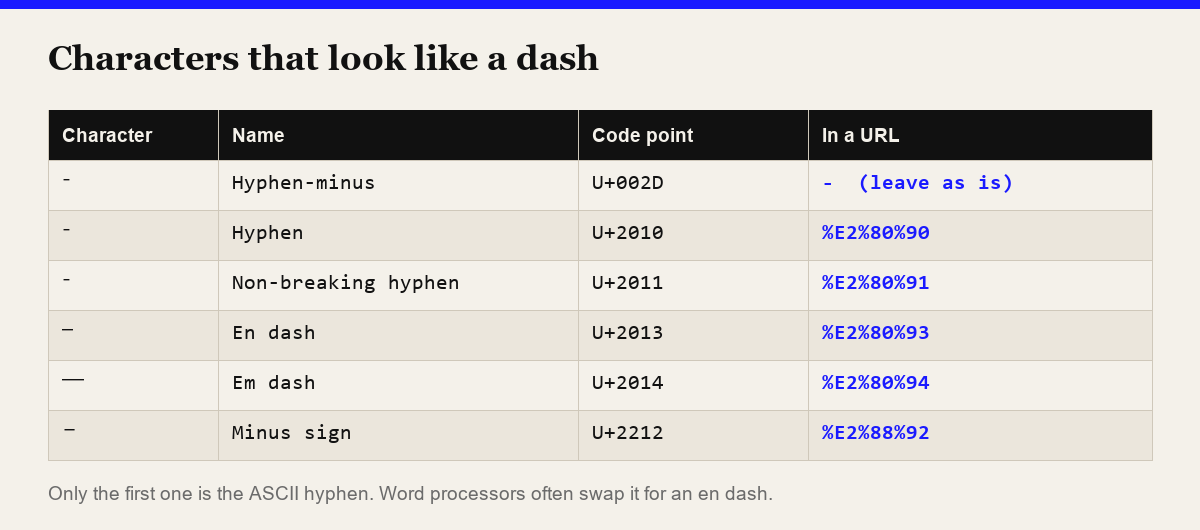
So a title typed as "Pre–Order" with an en dash and pasted into a URL gives /pre%E2%80%93order, not /pre-order. The page may still load, but you now have a URL nobody can type, and a second URL if anyone links to the hyphen version. Common places this happens: post titles drafted in Word or Google Docs, product names copied from a PDF catalogue, and CSV imports where a spreadsheet "corrected" the text.
To check a string, list its non-ASCII characters in the browser console:
[..."pre–order"].filter(c => c.codePointAt(0) > 127)
  .map(c => "U+" + c.codePointAt(0).toString(16).toUpperCase())
// [ 'U+2013' ]
Or let a slug function deal with it. The slug generator on this site replaces every character outside a-z and 0-9 with a separator, so Pre–Order Guide — 2026 becomes pre-order-guide-2026 and e‑mail tips (with a non-breaking hyphen) becomes e-mail-tips.
Hyphen or underscore in URLs?
Use hyphens between words. Google's URL structure guidelines say: "we recommend using hyphens (-) instead of underscores (_) to separate words in your URLs." Both characters are unreserved, so the choice is about readability and search, not encoding. The URL slug guide goes into the rest of what makes a slug work.
The other characters, one by one
The table shows what encodeURIComponent() produces and whether you need it in each part of the URL. "Encode" means: when the character is part of your data rather than URL syntax.
| Character | Encoded | In a path segment | In a query value |
|---|---|---|---|
- . _ ~ | unchanged | Safe as-is | Safe as-is |
| space | %20 | Encode as %20 | %20, or + in form encoding |
+ | %2B | Allowed literally | Encode, or it may be read as a space |
& | %26 | Allowed literally | Encode; it separates parameters |
= | %3D | Allowed literally | Encode; it separates key from value |
# | %23 | Encode; it starts the fragment | Encode; it starts the fragment |
? | %3F | Encode; it starts the query | Allowed, encoding is safer |
/ | %2F | Encode if it is inside one segment | Allowed, encoding is safer |
% | %25 | Always encode | Always encode |
@ : | %40 %3A | Allowed literally | Allowed, encoding is safer |
"Allowed literally" follows RFC 3986's grammar for path segments and queries. "Encoding is safer" means the RFC permits the raw character but some parsers, proxies or frameworks misread it, so encodeURIComponent() encodes it anyway and nothing breaks.
Space: %20 or +?
Both, depending on the format. %20 works everywhere. + means a space only in application/x-www-form-urlencoded data, which is what HTML forms send and what URLSearchParams produces. In a path, + is a literal plus sign. Decoding has the same split:
decodeURIComponent("hello+world")                    // "hello+world"
new URLSearchParams("q=hello+world").get("q")        // "hello world"
If your server reads + as a space, a literal plus in a value (a phone number like +966…, or Base64 data) must be sent as %2B.
Ampersand and equals
In a query string these are syntax. ?q=Faizan & Mohammed sends a parameter q with the value Faizan and a second, empty parameter. Encoded, it is ?q=Faizan%20%26%20Mohammed.
Hash
Everything after an unencoded # is the fragment, which the browser keeps to itself. A search for C# sent as ?q=C# reaches the server as q=C. Send ?q=C%23.
Percent
A bare % not followed by two hex digits is invalid, and decodeURIComponent("100%") throws URIError. Encode it as %25. If you see %2520 in a URL, something encoded an already-encoded %20 a second time.
Which JavaScript function to use
For a value going into a URL, encodeURIComponent(). For a whole URL you already trust, encodeURI(), which leaves / ? # & = + : @ alone. For building query strings, URLSearchParams, which uses + for spaces. MDN's encodeURIComponent() page lists exactly which characters it leaves alone: letters, digits and - _ . ! ~ * ' ( ). The full percent-encoding reference compares all three side by side with real output, covers Python, and explains the security side.
To check a single string quickly, the URL encoder has all three modes: encodeURIComponent, encodeURI, and Form Data (+spaces).
Is URL encoding a security measure?
No. It makes data fit URL syntax and nothing more; anyone can decode it. Encoding a user-supplied link does not stop a javascript: URL, and it does not validate a redirect target. Encoding vs hashing vs encryption covers where the line sits.
FAQ
Does the dash (-) need to be URL-encoded?
No. The ASCII hyphen-minus (U+002D) is an unreserved character in RFC 3986, so it is safe as-is in paths, query strings and fragments. Encoding it as %2D produces an equivalent URL that producers should avoid. Look-alike characters such as the en dash (U+2013) are not hyphens and must be encoded, as %E2%80%93.
What is the URL encoding for a space?
%20. In a query string sent as an HTML form (application/x-www-form-urlencoded), a space is written as + instead, and URLSearchParams does the same. In a path, a space is always %20.
What is the difference between encodeURI and encodeURIComponent in JavaScript?
encodeURI is for a whole URL and leaves delimiters such as / ? # & = + : @ unencoded. encodeURIComponent is for one value, such as a query parameter, and encodes all of those. Both leave letters, digits and - _ . ! ~ * ' ( ) alone. Use encodeURIComponent for parameter values.