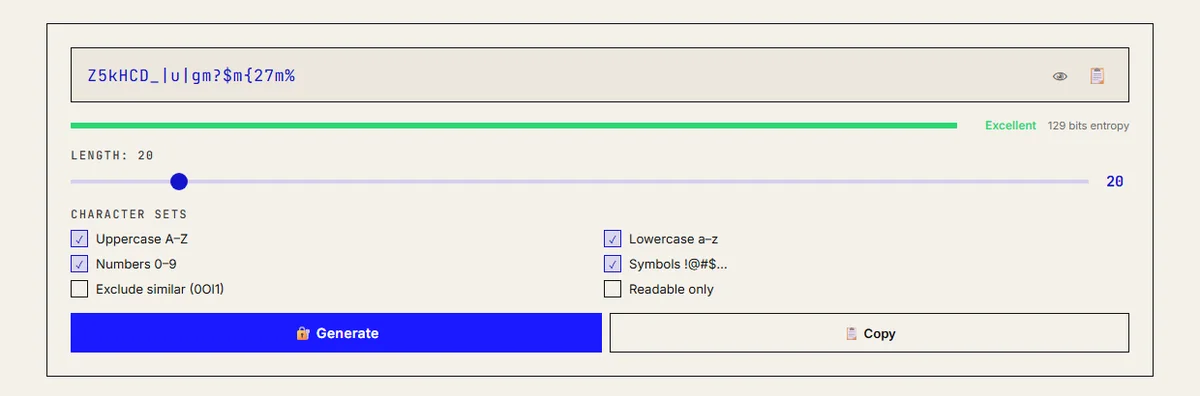
A good password generator does two things: it draws from a cryptographically secure random source, and it picks every character independently and uniformly from a known set. If both hold, the strength is simple arithmetic. A 20-character password from the 88 characters my password generator uses by default carries 20 × log2(88) ≈ 129 bits of entropy, which is far beyond what anyone can guess. The rest of this post shows that arithmetic, the code behind it, and what current NIST guidance says about length.
How the generator picks each character
The tool is a single HTML page, so you can read the whole algorithm in its source. Stripped down, it is this:
const UPPER = 'ABCDEFGHIJKLMNOPQRSTUVWXYZ', LOWER = 'abcdefghijklmnopqrstuvwxyz',
      NUMS = '0123456789', SYMS = '!@#$%^&*()_+-=[]{}|;:,.<>?';

function genPw(len, charset) {
  const arr = new Uint32Array(len);
  crypto.getRandomValues(arr);                       // OS-backed CSPRNG
  return Array.from(arr, v => charset[v % charset.length]).join('');
}
function entropy(len, cs) { return len * Math.log2(cs); }
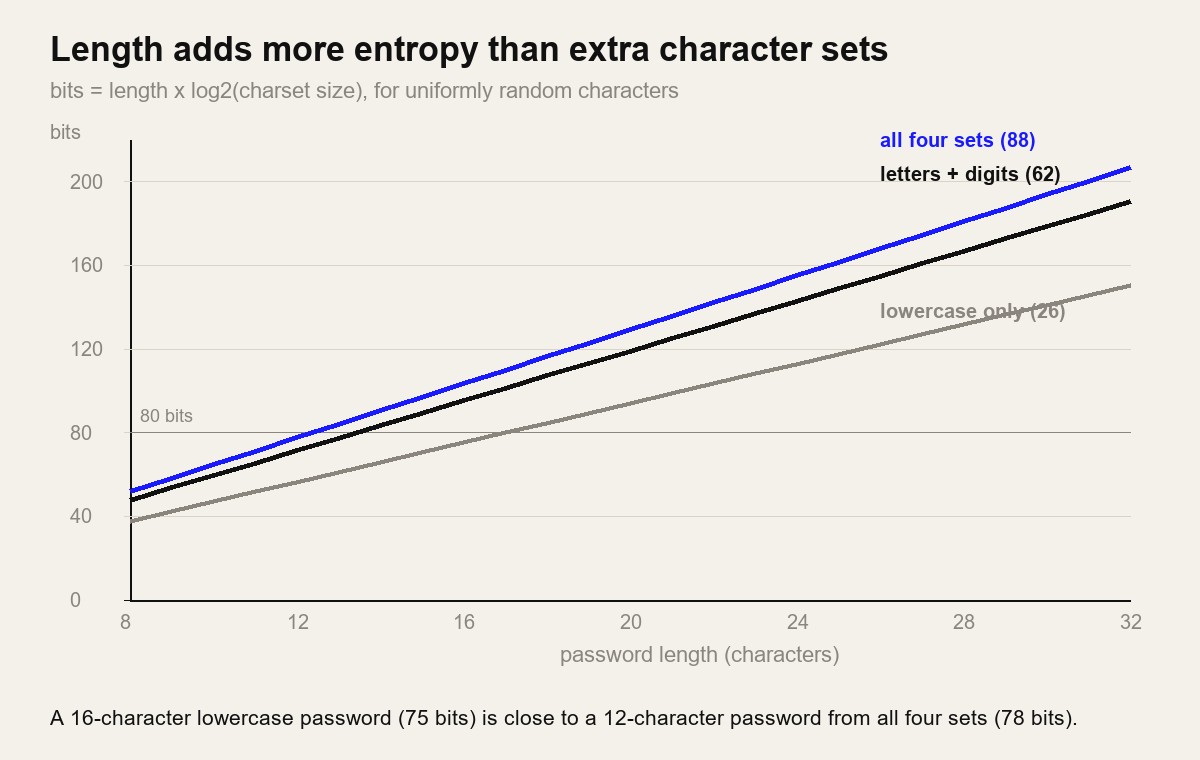
With all four boxes ticked, the set is 26 + 26 + 10 + 26 symbols = 88 characters, so each character adds log2(88) ≈ 6.46 bits. The options change the set size, and the strength meter recalculates from it:
- Exclude similar (0Ol1) removes
0 O l 1 I, leaving 83 characters (6.38 bits each). Worth it if someone will read the password off a screen and type it. - Readable only drops the symbols, leaving 62 characters (5.95 bits each), or 57 if you also exclude similar characters.
- The length slider runs from 8 to 128 and defaults to 16.
Note what the code does not do: it does not force "at least one digit and one symbol". That is deliberate. A password drawn uniformly from 88 characters is already as strong as the formula says, and forcing classes slightly reduces the number of possible outputs while making the result less uniform.
The modulo bias I found in my own code
Auditing the tool for this update, I checked one thing that generators often get wrong. v % charset.length maps a 32-bit random number onto 88 characters, but 232 is not a multiple of 88. The remainder is 48, so the first 48 characters of the set each get one extra chance in about 232. In numbers: those characters are more likely by a factor of 1.00000002, one part in about 49 million.
That is far too small to help an attacker with any realistic number of passwords, so the tool is fine as it is. If you write your own generator, though, especially one that uses a single random byte, the bias is real: 256 mod 88 = 80, so 80 of the 88 characters come up 1.5 times as often as the other 8. Use rejection sampling: throw away random values that fall in the uneven tail.
function generate(len, charset) {
  const limit = Math.floor(2 ** 32 / charset.length) * charset.length;
  const buf = new Uint32Array(1), out = [];
  while (out.length < len) {
    crypto.getRandomValues(buf);
    if (buf[0] < limit) out.push(charset[buf[0] % charset.length]);
  }
  return out.join('');
}
I ran this 880,000 times in Node.js with the 88-character set: every character appeared, with counts between 9,793 and 10,191 against an expected 10,000, which is normal sampling noise.
Why crypto.getRandomValues() and not Math.random()
MDN's page on Math.random() is direct about it: it "does not provide cryptographically secure random numbers. Do not use them for anything related to security." Its output looks random enough, but engines implement it with fast generators whose internal state can be reconstructed from enough observed outputs, after which every later value is predictable.
crypto.getRandomValues() is the browser's cryptographically secure generator. MDN describes it as a pseudo-random generator seeded with enough entropy, typically from the operating system, and notes it will throw if you ask for more than 65,536 bytes in one call. It works on plain HTTP pages too, unlike most of the Web Crypto API.
The server-side equivalents are Python's secrets module and Node's crypto module. Python's random module has the same weakness as Math.random().
What entropy in bits means
For a password picked uniformly at random, entropy is length × log2(set size), and an attacker who knows exactly how you generated it needs on average half of 2bits guesses. That formula only applies to random passwords. A human-chosen password has far less entropy than its length suggests, because people pick from patterns attackers already try first.
How fast those guesses go depends on the attacker's position. Against a login form with rate limiting, very slowly. Against a stolen database, it depends on how the site stored the password: a fast unsalted hash allows billions of guesses per second on GPUs, while a slow hash such as bcrypt or Argon2id cuts that by many orders of magnitude. The table uses two illustrative rates, chosen as assumptions to show scale rather than as measurements:
| Random password | Entropy | Average time at 1010 guesses/s | At 104 guesses/s |
|---|---|---|---|
| 8 characters, 88-set | 51.7 bits | about 2 days | about 5,700 years |
| 12 characters, 88-set | 77.5 bits | about 340,000 years | far longer |
| 16 characters, 88-set | 103.4 bits | about 2 × 10¹³ years | far longer |
| 20 characters, 88-set | 129.2 bits | about 1021 years | far longer |
| 5 random words from 7,776 | 64.6 bits | about 45 years | far longer |
| 6 random words from 7,776 | 77.5 bits | about 350,000 years | far longer |
Two things stand out. Length is the cheap lever: four extra characters add about 26 bits, more than switching a 16-character password from lowercase to all four sets (75 to 103 bits). And past roughly 80 to 100 bits, further length buys nothing you will notice. I use 20 characters for anything stored in a password manager because it costs nothing, not because 16 is weak.
What NIST SP 800-63B-4 says about length
The current US guidance for services that check passwords is NIST SP 800-63B-4. It is written for the people who build login systems, but it tells you what a reasonable site should accept from your generator:
- Passwords used as the only factor must be at least 15 characters. Passwords used only as part of multi-factor authentication may be shorter, but at least 8.
- Services should allow at least 64 characters, should accept all printing ASCII characters and the space, and should accept Unicode.
- They shall not impose composition rules such as "one uppercase, one number, one symbol", and shall not force periodic password changes. A change is required when there is evidence of compromise.
- They must check new passwords against a blocklist of common, expected or compromised values.
- They shall allow password managers and autofill, and should allow pasting into the password field.
The practical takeaway: if a site caps passwords at 12 or 16 characters or blocks paste, that is the site falling short of current guidance, and you should use the longest password it accepts. Advice to "change it more often" when a site limits length is not something NIST supports; a unique random password plus a second factor does more.
Passwords vs passphrases
You need to remember very few passwords: the password manager's master password, your device login, perhaps your email. For those, a passphrase of randomly chosen words is easier to type and memorise. The words must be picked at random, for example by rolling five dice per word against a 7,776-word list (65 = 7,776, about 12.9 bits per word). Six words give about 77.5 bits. A phrase you thought up yourself, or a song lyric, does not get that entropy.
Everything else belongs in the password manager as a random string. You never type it, so readability does not matter, and 20 characters from all four sets is a sensible default.
Using a password generator safely
- Check that it runs locally. Open DevTools, go to the Network tab, and click Generate. A client-side generator makes no request. Then search the page source for
getRandomValues; if you findMath.randomin the password code instead, close the tab. - Copy straight into the password manager. Most managers also have a built-in generator, which is just as good.
- One password per account. Reused passwords are what credential-stuffing attacks exploit: a leak from one site is tried against many others.
- Turn on a second factor for email, banking and anything that can reset other accounts. A passkey or authenticator app is better than SMS.
- Change it when a service reports a breach, and generate a fresh one rather than editing the old password.
Generating passwords in code
If you need passwords or tokens in a script, use the platform CSPRNG. Both of these were run and checked while updating this post:
# Python: secrets, never random
import secrets, string
chars = string.ascii_letters + string.digits + string.punctuation   # 94 characters
password = ''.join(secrets.choice(chars) for _ in range(20))          # ~131 bits
token = secrets.token_urlsafe(24)                                     # 32 chars, 192 bits

// Node.js
const crypto = require('crypto');
const token = crypto.randomBytes(24).toString('base64url');           // 32 chars, 192 bits
secrets.choice() handles the modulo problem for you. For tokens, encoding random bytes as base64url is simpler than mapping to a character set, and the Base64 tool will show you what that encoding does. If you need unique identifiers rather than secrets, a UUID v4 uses the same randomness source but is not meant to be a password.
Generating strong passwords is only the user side. On the server, they must be stored with a slow, salted password hash; the OWASP Password Storage Cheat Sheet recommends Argon2id first. My password security guide for web teams covers storage and policy, MD5 vs SHA-256 explains why a plain hash is not enough, and encoding vs hashing vs encryption sorts out which tool does what.
Frequently asked questions
Is a free online password generator safe to use?
It is safe if it generates the password in your browser with crypto.getRandomValues() and sends nothing over the network. You can check both: read the page source for the random function, and watch the Network tab in DevTools while you click Generate.
How long should a generated password be?
For passwords kept in a password manager, 16 to 20 random characters from all four character sets gives roughly 103 to 129 bits of entropy. NIST SP 800-63B-4 requires services to accept at least 15 characters for single-factor passwords and recommends allowing up to 64.
Should I use a passphrase instead of a random password?
Use a passphrase for the few secrets you must type from memory, such as your password manager's master password or your laptop login. Six words picked at random from a 7,776-word list give about 77.5 bits. Use random character strings for everything stored in the manager.