Robotics programming is writing the software that lets a machine sense its surroundings, decide what to do and move safely. It is harder than web development because the code runs against hardware that has noise, delay and momentum. Tools like Claude Code, Anthropic's agentic coding tool, are making that first hard stretch shorter for junior developers. They are not a shortcut around understanding the robot, and the evidence I found is mixed in useful ways. This guide covers the basics, what the studies actually show, a safe worked example and the habits that keep a robot, and the people near it, unharmed.
What robotics programming involves
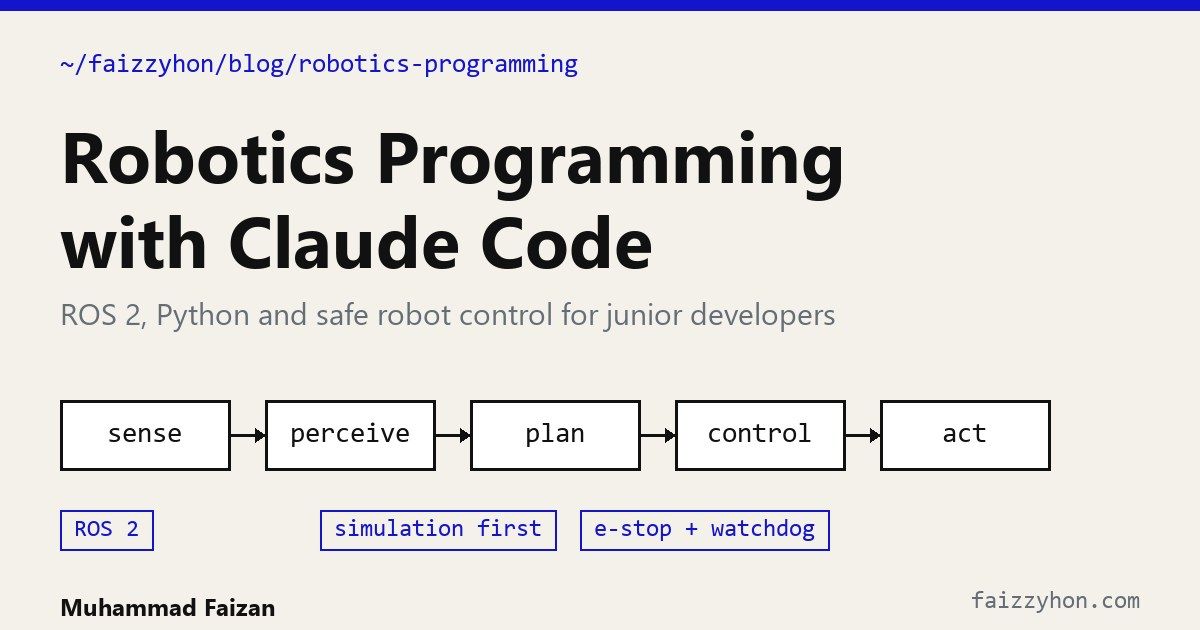
Almost every robot, from a hobby rover to a warehouse arm, runs the same loop:
- Sense: read cameras, lidar, encoders and inertial sensors.
- Perceive: turn raw readings into objects, obstacles and a position estimate.
- Plan: choose a path or an action.
- Control: convert the plan into velocity or torque commands, many times a second.
- Act: motors move, and the world changes, which the sensors then see.
Most teams build this on ROS 2, the Robot Operating System, which is middleware rather than an operating system. Programs are split into nodes that exchange typed messages over topics, and Python (rclpy) and C++ (rclcpp) are the main languages. Humble Hawksbill and Jazzy Jalisco are the long-term-support releases listed in REP 2000, so beginners should pick one of those and check the page for what is current. You can practise without hardware in simulators such as Gazebo, which is the habit I recommend below.
Why robot code is hard for junior developers
- Many layers at once. A bug may be in your code, a driver, a message type, a coordinate frame or a loose cable.
- Silent unit and frame mistakes. A velocity in the wrong frame compiles fine and drives the robot the wrong way.
- Timing. A stale sensor reading is worse than none, and nothing in the type system tells you the data is old.
- Documentation sprawl. Vendor SDKs, ROS packages and forum posts disagree, and some online advice is wrong.
- Real consequences. A web bug shows an error page. A control bug can break hardware or hurt someone.
What the evidence says about Claude Code and robots
Anthropic published a controlled experiment called Project Fetch, and it is the best public evidence I found for this topic. Treat it as one experiment, not a law.
Phase one (2025): non-experts and a robot dog
Eight Anthropic staff with no deep robotics background were split into two teams of four. One team could use Claude and one could not, and both worked on a quadruped robot dog over a single day. According to Anthropic's write-up:
- The Claude team completed 7 of 8 tasks and the other team 6 of 8.
- On tasks both teams finished, the Claude team took about half the time.
- Connecting to the robot and its sensors was where Claude helped most. The team without it discarded the easiest connection method too early and struggled to get usable lidar data.
- The Claude team wrote about nine times more code, and some of it was side quests. The team without Claude was faster at writing its control program and at localization.
- The team without Claude showed more confusion and negative emotion, and reported feeling their coding skills were less sharp without it.
The authors list the caveats themselves: two teams, one day, a convenience sample of people who already use Claude daily, and tasks that were interesting but practically trivial.
Phase two (2026): the model driving
In a follow-up published in June 2026, Anthropic ran Claude Opus 4.7 inside Claude Code with a researcher only connecting the laptop, entering the first prompt and approving commands and moves. On the four tasks both human teams completed, it was about 19 times faster than the Claude-assisted team and 38 times faster than the team without Claude, and it wrote 1,045 lines of code against 10,309 for the Claude-assisted team. Anthropic also states what did not work: Claude could not precisely nudge the beach ball and did not complete autonomous fetching, and none of the tasks involved low-level control such as writing an actuation policy. Anthropic says plainly that large language models have not "solved robotics".
The learning risk
For junior developers the other study matters as much. In a randomized trial of 52 mostly junior engineers learning an unfamiliar Python library, the group using AI scored 50% on a follow-up quiz and the hand-coding group 67%. The AI group finished only about two minutes faster, which was not statistically significant, and the largest gap was on debugging questions. The patterns that kept learning were asking for explanations, asking conceptual questions, or generating code and then working to understand it. Pure delegation scored lowest. The authors note these patterns are associations, not proven causes. The details are in Anthropic's study. Debugging is exactly the skill robotics needs most, so this is the main thing to guard.
How Claude Code helps with robot programming
Claude Code reads your codebase, edits files and runs commands in your terminal, IDE or desktop app, and a project instruction file called CLAUDE.md sets the rules it follows each session, per the Claude Code documentation. For robotics that maps onto real jobs.
- Bring-up. Getting a new robot or sensor talking. Ask it to read the vendor docs and your
ros2 topic listoutput and propose a minimal connection test. - Scaffolding nodes. Publishers, subscribers, parameters, launch files and a package layout, which is boilerplate that costs beginners hours.
- Explaining messages and frames. Paste
ros2 interface show geometry_msgs/msg/Twistand ask what each field means and in which frame. - Reading logs and failures. Hand it a stack trace or a QoS mismatch warning and ask for the cause and the next experiment.
- Tests and simulation. Generate unit tests for control logic and scripts that run a node in Gazebo, so mistakes cost nothing.
- Code review. Ask it to hunt for unsafe behaviour: missing speed limits, no timeout, unhandled shutdown.
A worked example: a node that stops when in doubt
This is the kind of small, safety-first node a junior developer can ask Claude Code to draft and then must read line by line. It drives forward slowly, and stops if the nearest obstacle is too close, if no valid lidar reading exists, or if the scan is stale. I syntax-checked it but did not run it on a robot, so test it in simulation first.
import rclpy
from rclpy.node import Node
from rclpy.qos import qos_profile_sensor_data
from sensor_msgs.msg import LaserScan
from geometry_msgs.msg import Twist


class SafeDrive(Node):
    """Drive forward slowly, stop on any doubt: close obstacle, no scan, stale scan."""

    def __init__(self):
        super().__init__('safe_drive')
        self.declare_parameter('stop_distance', 0.5)   # metres
        self.declare_parameter('forward_speed', 0.15)  # m/s, keep it low
        self.declare_parameter('scan_timeout', 0.5)    # seconds
        self.nearest = 0.0                             # unknown means unsafe
        self.last_scan = None
        self.cmd_pub = self.create_publisher(Twist, 'cmd_vel', 10)
        self.create_subscription(LaserScan, 'scan', self.on_scan, qos_profile_sensor_data)
        self.create_timer(0.1, self.tick)

    def on_scan(self, msg):
        # Assumes index 0 points straight ahead. Check your sensor's frame first.
        cone = list(msg.ranges[:15]) + list(msg.ranges[-15:])
        valid = [r for r in cone if msg.range_min < r < msg.range_max]
        self.nearest = min(valid) if valid else 0.0
        self.last_scan = self.get_clock().now()

    def tick(self):
        cmd = Twist()
        stop = self.get_parameter('stop_distance').value
        timeout = self.get_parameter('scan_timeout').value
        stale = (self.last_scan is None or
                 (self.get_clock().now() - self.last_scan).nanoseconds > timeout * 1e9)
        if not stale and self.nearest > stop:
            cmd.linear.x = self.get_parameter('forward_speed').value
        self.cmd_pub.publish(cmd)  # a zero Twist is an explicit stop


def main():
    rclpy.init()
    node = SafeDrive()
    try:
        rclpy.spin(node)
    except KeyboardInterrupt:
        pass
    finally:
        node.cmd_pub.publish(Twist())  # always leave the robot stopped
        node.destroy_node()
        rclpy.try_shutdown()


if __name__ == '__main__':
    main()
Notice what the example is built around. Unknown means unsafe, since no valid reading gives a distance of zero. Speed is a parameter kept low. A zero Twist message is an explicit stop. The shutdown path stops the robot. And the comment about the scan frame is a reminder to verify an assumption instead of trusting it, which is precisely the kind of detail an assistant can get wrong.
A CLAUDE.md that keeps the robot safe
The rules you want enforced every session belong in the project file. A starting point:
# Robot project rules
- ROS 2 Jazzy, Python 3.12, colcon workspace in ~/ws. Simulation: Gazebo with the TurtleBot3 world.
- NEVER run anything that sends velocity to real hardware. Simulation only, unless I say "hardware run".
- Every motion node needs: max speed parameter, a stale-sensor watchdog, a zero command on shutdown.
- Do not invent topic names, message fields or parameters. Read them with `ros2 interface show` or `ros2 topic list` and quote the output.
- After each change: `colcon build`, `colcon test`, then explain what you changed and why in plain English.
The "do not invent topic names" line matters. Assistants can produce plausible but wrong message fields or parameters, and forcing it to quote real command output makes those mistakes visible.
Workflow for a junior developer
- Simulate first. Run everything in Gazebo or a similar simulator until it behaves.
- Ask for a plan before code. Read the plan and ask why when something is unfamiliar.
- Make it explain. After each change, ask what each line does and what would break if you removed it. This is the "generate then comprehend" pattern from the study.
- Write the safety layer yourself or review it twice. Limits, watchdogs and emergency stop logic deserve the most scrutiny.
- Debug by hand sometimes. Use
ros2 topic echo,rqtand logs on your own so the skill does not fade. - Move to hardware gradually. Lifted wheels or a restrained robot first, low speed limits, a physical emergency stop within reach and a second person watching.
Risks and limits
- Physical safety is not the assistant's job. A hardware emergency stop and speed limits must work even if the software is wrong.
- Hallucinated APIs. Verify every topic, message field and parameter against the real interfaces.
- Skill erosion. Delegating everything produced the weakest learning in the study above.
- Hard problems remain. Anthropic's own results show precise manipulation and low-level control are not solved.
- Small evidence base. Project Fetch is two teams and a handful of trials, so read it as a signal.
Frequently asked questions
How do I start robotics programming as a beginner?
Learn Python, install a long-term-support ROS 2 release, and work through the official tutorials using a simulator such as Gazebo with a TurtleBot3 model. Add hardware later.
Can AI write robot control code?
It can write useful nodes, launch files and tests, and in Anthropic's experiment it handled sensor connection and several perception tasks quickly. It cannot yet be trusted with low-level control or safety on its own, and every line that moves hardware needs a human review.
Is Claude Code good for ROS 2?
It works with any codebase it can read and run commands in, so ROS 2 Python and C++ packages are fine. The results depend on how good your CLAUDE.md rules are and whether you give it real command output to work from.
Do I need ROS to program robots?
No. Small robots run plain Python or Arduino code. ROS 2 pays off once you have several sensors, nodes or machines that must communicate.
Will AI make junior robotics developers worse?
Only if used as pure delegation. The study found the groups that asked for explanations and concepts kept their learning, so use it as a tutor and reviewer as well as a code generator.
If you want help building or reviewing AI-assisted software, see my services or contact me. Related reading on this site: building a multilingual LLM pipeline.
Sources
- Anthropic Frontier Red Team. Project Fetch, 2025.
- Anthropic Frontier Red Team. Project Fetch: Phase Two, June 2026.
- Shen and Tamkin. How AI assistance impacts the formation of coding skills, Anthropic, January 2026, with the arXiv preprint.
- Anthropic. Claude Code overview.
- Open Robotics. ROS 2 documentation and REP 2000: ROS 2 releases and target platforms.