On Thursday 12 November 2026, a Microsoft outage cut off Outlook, Exchange Online, Teams and other Microsoft 365 services for people in many countries, and it was still being repaired on Friday. If you came looking for why it happened, here is the honest answer: Microsoft has not published a root cause. It has said it will release a full post-incident report once mitigation is complete. What exists now is a set of partial statements, and this article treats them as evidence, marks what is confirmed and what is inference, and then shows how new developers can avoid building the same trap. I will update it when the report appears.
Status as of 13 November 2026. Details may change.
What happened: the timeline
- Thursday 12 November, 16:17 UTC. The Exchange Online incident (EX1550543) begins, according to The National. A broader Microsoft 365 incident was tracked as MO1550821 (SecurityWeek).
- Spread. Reports started in the Americas and then widened to any region, per TechCrunch. Downdetector recorded reports from 74 countries and territories, with Outlook reports peaking at more than 2,000 times normal.
- Services hit. Outlook and Exchange Online, Teams, SharePoint, Copilot and Defender XDR. TechCrunch adds that consumers also lost OneDrive, Office for the web and other services.
- Who noticed. ABC News reports more than 120,000 US Outlook reports and 45,000 Microsoft 365 reports on Downdetector, plus effects on the US House of Representatives, Japan's government IT, Australian agencies, businesses and telehealth. Anthropic and OpenAI also reported issues with their Microsoft 365 connectors.
- Friday 13 November. Microsoft reported gradual recovery. About an hour after the first recovery step, restored servers were becoming unresponsive again (ABC News). It extended the email timeout to 48 hours so delayed messages would not bounce, and said recovery was complete on parts of the Asia-Pacific infrastructure (The National).
What about Hotmail?
Many people search "Hotmail down" during an Outlook outage because Hotmail addresses use Microsoft's consumer email service. TechCrunch reports that business and consumer users were both unable to reach inboxes. None of the articles I read name Hotmail or Outlook.com specifically. If your Hotmail account is affected, Microsoft's service health page is the place to check. One third-party blog also describes a separate earlier problem in which mail to Hotmail and Outlook.com was blocked after a spam rule update. I could not confirm that against any Microsoft source, so I am not treating it as fact.
Why it happened: what the evidence supports
Microsoft's explanation changed over the first day, and that shift is the most informative evidence. It first blamed "elevated load". It then clarified that the load came from a large number of servers becoming unavailable, not from a surge of users. Later updates added that affected servers were failing automated health checks, that a process responsible for establishing secure connections had become overwhelmed, and that restored servers sometimes stopped responding again. Mitigation included adjusting traffic protocols, redistributing traffic, applying strategic traffic blocking, re-isolating part of the infrastructure and restarting components. Microsoft also tested a workaround that bypasses the component that processes health checks, per SecurityWeek.
Claim by claim
| Claim | Status | Source |
|---|---|---|
| A large number of servers became unavailable, and the remaining servers took the load; overall user traffic did not rise. | Stated by Microsoft | TechCrunch, SecurityWeek, The National |
| Affected servers failed automated health checks, and the failures may originate from a component that processes server health. | Stated by Microsoft | The National |
| A process that establishes secure connections became overwhelmed, so servers stopped processing requests. | Stated by Microsoft | SecurityWeek, ABC News |
| Restored servers became unresponsive again as traffic returned. | Stated by Microsoft | ABC News |
| A recent network configuration change triggered it. | Unconfirmed: Microsoft began a rollback, but reports conflict on whether it identified a change | SecurityWeek |
| A cyberattack caused it. | Microsoft says it has no evidence of malicious activity. That is a statement, not a finished investigation | SecurityWeek, ABC News |
| The Patch Tuesday fixes two days earlier caused it. | No evidence. Microsoft's advisories have not linked them | SecurityWeek |
| The final root cause. | Not published. Microsoft promised a post-incident report | The National |
My inference: a cascading failure
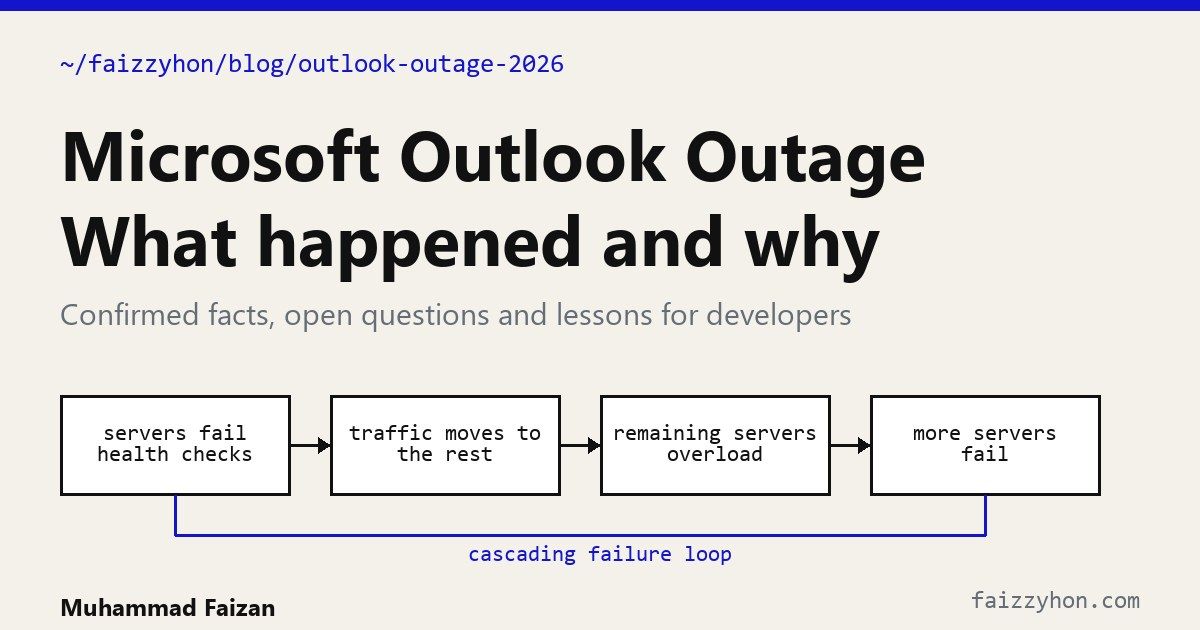
The following is my interpretation of the evidence above, not a finding by Microsoft. Put together, the statements describe the textbook shape of a cascading failure, which Google's Site Reliability Engineering book defines as a failure that grows over time as a result of positive feedback. In outline:
- A trigger removes capacity. Microsoft has not said what. A bad change is the usual suspect in outages generally, and Microsoft began rolling back a network configuration change, but it has not confirmed it as the cause.
- Health checks pull more servers out. If servers fail the checks, the load balancer stops sending them traffic. The SRE book warns that overloaded servers failing health checks can be killed and restarted, shrinking capacity further.
- The remaining servers take the same traffic. Microsoft said total traffic had not risen, so each survivor carried more.
- A shared resource saturates. The secure-connection process becoming overwhelmed fits this step. Setting up encrypted connections is expensive, and a burst of reconnecting clients makes it worse.
- Recovery re-triggers the failure. When restored servers rejoin, the waiting backlog and retries hit them at once, and they can fail again. Microsoft reported exactly that, and the SRE book calls this the crash-loop trap, where restarted servers get slammed and fail immediately.
This is why fixing it took more than a restart: the system had to be cut off from traffic, rebuilt slowly and let back in gradually. I cannot say whether each step happened as I describe, and the report may show a different trigger or a bug in the health-check component itself. Treat the loop as the pattern to learn, and the report as the final word.
It was not the first
TechCrunch notes that the previous major incident was a days-long Microsoft 365 outage in September, which Microsoft blamed on a problem in its core authentication configuration. Two large incidents in two months do not prove they share a cause, but both involve configuration and shared infrastructure.
What new developers can learn: seven habits
1. Treat every change as the likely cause
Most large outages begin with a change, even when it later proves not to be the root cause. Roll changes out in stages (one server, then one percent, then everyone), watch a few key metrics at each stage, and keep a fast, rehearsed way to undo them. Feature flags make rollback a switch instead of a redeploy.
2. Do not let health checks become the outage
A health check decides who gets traffic, so a wrong check is dangerous. Keep checks cheap and separate "is the process alive" from "can it serve right now". Set a floor: if checks would remove more than a safe share of servers, stop removing them and alert a human, because a degraded fleet beats an empty one.
3. Shed load before you collapse
An overloaded server that tries to serve everyone serves no one. Reject excess requests early and cheaply, set timeouts everywhere, and drop non-essential work first. Google's chapter on handling overload covers load shedding and graceful degradation.
4. Retry politely or do not retry
Retries are meant to help and often finish the job of an outage: thousands of clients retrying in lockstep keep a struggling service down. Use exponential backoff with random jitter, cap attempts, and limit retries to a small share of traffic. Here is a minimal version I tested with a small script:
import random
import time


class TransientError(Exception):
    """Raise this for failures worth retrying (timeouts, 503s). Never for bad input."""


class RetryBudget:
    """Allow retries only while they stay a small share of all requests."""

    def __init__(self, ratio=0.1):
        self.ratio, self.requests, self.retries = ratio, 0, 0

    def record_request(self):
        self.requests += 1

    def take(self):
        if self.retries + 1 > max(1, self.requests * self.ratio):
            return False
        self.retries += 1
        return True


def call_with_retries(fn, budget, attempts=4, base=0.2, cap=5.0):
    budget.record_request()
    for attempt in range(attempts):
        try:
            return fn()
        except TransientError:
            last = attempt == attempts - 1
            if last or not budget.take():
                raise  # fail fast so the caller can degrade instead of piling on
            # full jitter: random wait up to an exponentially growing ceiling
            time.sleep(random.uniform(0, min(cap, base * 2 ** attempt)))
The budget is the important part. When the service is unhealthy, most calls fail, the budget runs out, and callers stop adding load.
5. Warm up and ramp, do not slam
A server that just started has cold caches and empty connection pools. Bring it back by sending a small share of traffic, then more as it proves stable. This is the lesson of Microsoft's second wave of failures.
6. Limit the blast radius
Split systems into independent cells or regions, so a bad change reaches a few customers first. Be careful with shared dependencies such as authentication, certificates and the health system itself, because they turn local faults into global ones. The September and November incidents both involved shared infrastructure.
7. Write blameless post-incident reports
Microsoft promised a report with the root cause and "defense-in-depth actions". That is the right shape: what happened, why the safeguards did not stop it, and what will change. Practise it on your own small incidents. Google's postmortem culture chapter explains why blaming people hides the real causes.
A checklist for your own projects
- Can I roll back my last deploy in under five minutes, and have I tried it?
- Do all outgoing calls have a timeout and a retry limit?
- What happens to my app when a dependency, such as email or auth, is down for a day?
- Is my alerting independent of the thing it monitors? If your only alert channel is your Outlook inbox, an Outlook outage hides it.
- Do I have a status page or message ready, so users hear from me first?
- Have I tested what happens when all servers restart at once?
What to do if you were affected
- Check Microsoft's service health page for your tenant or account before changing settings.
- Do not repeatedly resend important email. Microsoft extended its email timeout to 48 hours, so delayed messages should arrive.
- For urgent business, use another channel and keep a backup contact method outside one provider.
- Be wary of "fix" emails and calls during an outage. Attackers use incidents as cover, and Microsoft says it sees no malicious activity in this one.
Frequently asked questions
Why did Microsoft Outlook go down in November 2026?
Microsoft has not published a root cause. It says many servers became unavailable, failed automated health checks and left the rest overloaded, with a secure-connection process overwhelmed. It has not confirmed what started the chain.
Was the Microsoft outage a cyberattack?
Microsoft says it has no evidence of malicious activity. Its full investigation is not finished, so treat that as a current statement, not a final finding.
Was Hotmail affected?
Consumers were reported affected, but the sources I read do not name Hotmail or Outlook.com. Check Microsoft's service health page for your account.
When will Microsoft publish the root cause?
Microsoft said it would share a post-incident report with root cause and defense-in-depth actions after mitigation is complete. No date has been given.
How can developers prevent outages like this?
Use staged rollouts and fast rollback, cheap health checks with a floor, load shedding, retries with backoff and a budget, gradual traffic ramp-up, small blast radii and blameless postmortems.
For related reading, see how AI is changing cybersecurity, or contact me if you want a review of your system's failure modes.
Sources
- TechCrunch. Microsoft's Outlook email hit by new outage, 12 November 2026.
- SecurityWeek. Microsoft 365 Outage Disrupts Outlook, Exchange Online and Teams.
- ABC News (Australia). Microsoft outage continues, disrupting Outlook, Teams for businesses and governments, 13 November 2026.
- The National. Outlook email outage: Microsoft says service recovery completed in parts of Asia-Pacific, 13 November 2026.
- Google. Addressing Cascading Failures, Handling Overload and Postmortem Culture, Site Reliability Engineering.